Share article:


Fix Guide: Prime Video Download Not Working

Updated: 2026-04-21
Related to: Amazon Downloader
13 Views
Summary:
Find the Prime Video not downloading on your device? Check out the common causes, 10 proven fixes, and the ultimate workaround for permanent offline viewing.
Nothing can be more frustrating than this: I was preparing for a long flight and found Prime Video not downloading. I’ve run into this issue before, but this time it was so annoying because I had nothing saved on my phone to pass the time right before traveling. But eventually, I figured it out. In this guide, I will walk you through the real reasons behind it, share 10 proven fixes that worked for me, and introduce a more reliable solution for offline viewing.
MenuCLOSE
1. Main Reasons Why Downloads Fail
After dealing with Prime Video not downloading repeatedly, I started noticing patterns. So, why can’t I download Amazon video? In most cases, the issue comes down to a few common causes.
1.1 Licensing & Region Restrictions
One thing I’ve learned is that not every title is downloadable in every region. When I travel, I notice that some shows suddenly lose the download option, even though I can still stream them. Licensing agreements vary by country, and people sometimes use a VPN to get around. But in my experience, it usually makes things worse by triggering Amazon’s alert.
1.2 Network Instability
A weak or unstable connection is one of the most common reasons behind Prime Video download not working. It is worth noting that downloads are far more sensitive to interruptions. I’ve also noticed that crowded Wi-Fi networks, slow speeds, or background apps using bandwidth can easily cause downloads to stall or fail.
1.3 Storage & Device Issues
This happens. If my device doesn’t have enough free space, downloads either won’t start or fail halfway. Meanwhile, corrupted cache files on my device can also cause the Amazon Prime Video not downloading issue.
1.4 VPN or Proxy Interference
Have you been using a VPN? I found Prime Video not downloading when I forgot to turn off my VPN. I researched a bit and found that Prime Video uses location checks, and a mismatch between regions can block downloads entirely.
1.5 App or System Bugs
Why can’t I download Amazon Video? Sometimes, outdated apps, old operating systems, or minor glitches can cause downloads to fail unexpectedly. I’ve run into this issue myself when I realized my Amazon Prime Video app wasn’t updated to the latest version.
2. Step-by-Step Fixes (10 Proven Methods)
As you can see, I’ve concluded the causes behind Prime Video not downloading. After testing different solutions, I’ve also narrowed down the methods that actually fix it.
2.1 Check Eligibility
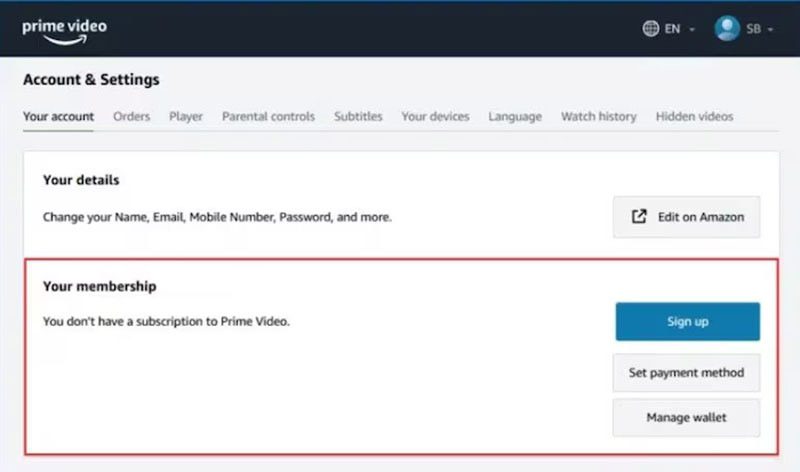
When you find Prime Video won’t download, fret not, check the title’s eligibility first. For instance, I confirm the title actually supports downloads. If there’s no download icon, it simply isn’t available offline. Meanwhile, I also double-check my subscription status (Profile > Account & Settings) and test another title to see if the issue is content-specific.
2.2 Switch Network (Wi-Fi / Cellular)
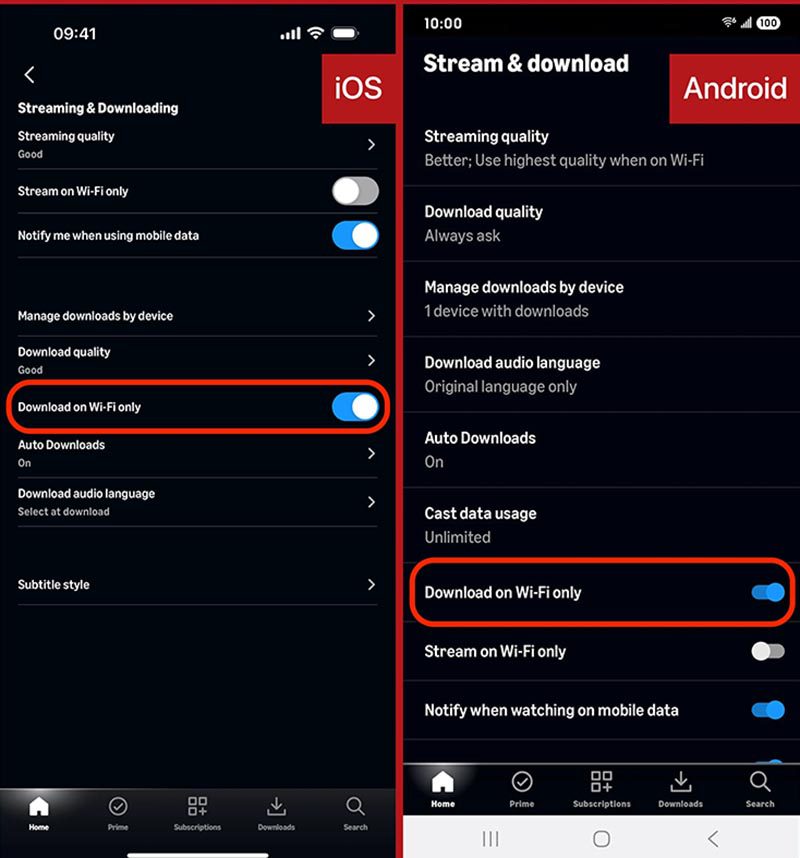
If downloads are not starting, I try this: switch between Wi-Fi and mobile data. I also check whether “Download on Wi-Fi Only” is enabled. This is the path I found for iOS and Android: Settings > Stream & Download > Download on Wi-Fi Only. Make sure to disable it.
2.3 Free Up Storage
When it comes make sure my device has at least 3-5 GB of available storage before downloading. I also delete unused apps, old videos, or cached files to save space for Amazon Video downloads.
2.4 Disable VPN/Proxy
If you often use a VPN/proxy just like me, it’s best to disable it for Amazon streaming or downloading. After disabling it, I restart the app and try again, and I find that this often fixes the region-related Prime Video not downloading issue quickly.
2.5 Update App & OS
I also check that both my Prime Video app and device operating system are fully updated. Updating them to the latest version can avoid the Prime Video download not working issue and other errors, improving stability and performance as a whole.
2.6 Restart App & Device
When Prime Video won’t download, I force close the Prime Video app and restart my device. A full sign-out, force-quit, then reboot clears temporary glitches and refreshes system processes. And guess what? It often resolves download issues quickly.
2.7 Lower Download Quality
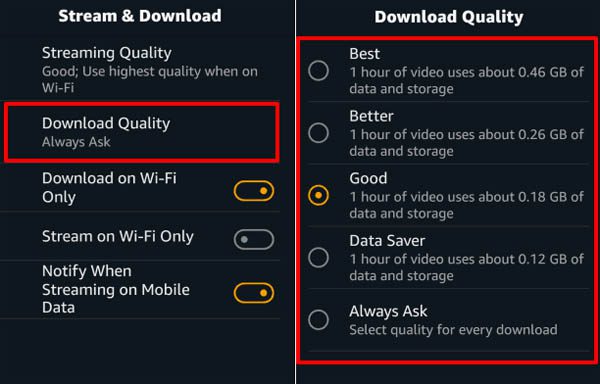
If my Prime Video downloading keeps failing, I switch the video quality to “Good” or “Data Saver” in settings. Here’s how I do it: My Stuff > Settings > Streaming & Downloading > Download Quality. Change the quality to Good or Data Saver. Lower quality reduces file size and bandwidth usage, so my downloads can be more stable, especially with slower internet connections.
2.8 Change Download Location (if supported)
On supported devices, for instance, my Android phone, I simply change the download location to internal storage instead of external storage(your SD card). I read from the tech expert that internal storage tends to be faster and more reliable, which makes downloads much more stable.
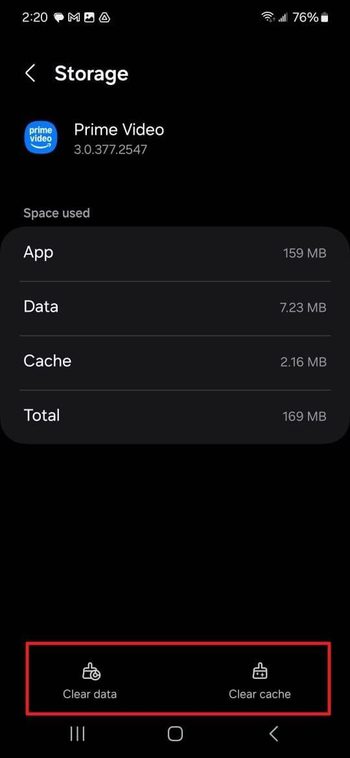
2.9 Clear App Cache
I also cleared the Prime Video app cache through my device settings to remove temporary files that may be corrupted. For Android, I go to: Settings > Apps > Prime Video > Storage > Clear cache. For iOS, Settings > General > iPhone Storage, and choose Amazon Prime to manually offload the app. After clearing it, I signed back into my account and tried again. Based on my experience, it often resolves unexplained download failures.
2.10 Reinstall Prime Video
If nothing else works, I just uninstall the Prime Video app completely, restart my device, and reinstall it fresh. This removes any hidden bugs or corrupted data. I can have a clean start and see if it helps with the Prime Video not downloading issue.
3. Ultimate Solution: Download with Moyea Amazon Downloader
If you have read this far, now you know the causes behind the Prime Video not downloading issues and 10 practical fixes. However, the issue might be persistent due to region restrictions. Not to mention the expiration limits, even if you’ve successfully downloaded the content. Hence, I’ve decided to download Prime Video titles directly to my computer as MP4 or MKV files, and Moyea Amazon Downloader is my best help.

-
Batch download Amazon Prime Video movies and full or selected seasons of shows at up to 1080p resolution with preferred subtitles and audio tracks. Download Amazon Prime Movies as MP4 or MKV file for offline viewing without expiration, and remove ads for offline ad-free watching.

Once I download Amazon Prime content with it, the downloaded videos don’t expire. I can also download entire seasons in one go, keep everything neatly organized, and even retain multi-language subtitles for a better viewing experience. For me, this has become the most reliable workaround whenever Prime Video won’t download or keeps failing unexpectedly.
4. FAQs
1. How Long Do Prime Video Downloads Last?
Generally, I have 30 days from the download date to start watching. Once you begin playback, the title expires after 48 hours, even if you haven’t finished. Some titles may have different windows based on licensing.
2. How Many Titles Can You Download on Prime Video?
Most accounts are limited to about 15-25 titles downloaded at any time across all devices(linked to your Amazon account). Amazon Originals sometimes don’t count toward the limit, but it varies by region.
3. Can I send the Downloaded Titles to My Friends?
No. Official Prime Video downloads are tied to your account and device. They cannot be shared or transferred easily. However, you can use Moyea Amazon Downloader to save your favorite titles and share them with your friends easily.
 Terms of Use: Moyea is intended solely for personal, educational, and non-commercial archival purposes use. It allows users to save a local copy of videos that they have legally subscribed or purchased. Any commercial utilization, unauthorized redistribution, or online sharing is prohibited. Users assume full responsibility for complying with copyright laws.
Amazon Downloader

 Try for Free
 Try for Free
 Download Amazon Prime videos to 1080P MP4/MKV files.
Support batch Amazon Prime video downloads
Save subtitles and audio tracks.
Pack subtitles to video or save as SRT/SUP file.
Remove ads during Amazon Prime video downloads.
Related
Best Amazon Prime Video Recorders: Record with the Best
How to Download Amazon Prime Videos to iPhone/iPad
Where Are Prime Video Downloads Stored on PC/Mobile?

How to Contact Amazon Prime Video Customer Service for Help/Support?
Quick Guide: How Long Do Prime Video Downloads Last?

Easy Guide: How to Burn Amazon Videos to DVDs?


 English
 日本語
日本語