Share article:


StreamFab Netflix Downloader Review: Features, Pros & Cons

Updated: 2026-03-31
Related to: Moyea Netflix Downloader
14 Views
What This Guide Covers
- In this StreamFab Netflix Downloader Review, we will share real-life details about its performance, features, and limitations for downloading Netflix content. We will also compare it with Moyea Netflix Downloader, highlighting the reasons why Moyea can be a more reliable and efficient choice for viewing offline.
With the Netflix built-in downloading features, your downloads are only available on the Netflix application for a limited time. That is where helpful applications such as StreamFab Netflix Downloader can be found. This program lets users save Netflix videos in formats like MP4/MKV, directly into their device gallery. In this article, we will have a closer look at how the StreamFab Netflix Downloader works, what it offers as functionality, and whether it is worth it.
Quick AccessCLOSE
Core Features Breakdown of StreamFab Netflix Downloader
The actual question, when discussing a tool such as this, is a very straightforward one: what does it bring to the overall Netflix experience? Below, we are going to discuss some of the key features below.
Features
- Download Netflix Videos in MP4 or MKV. StreamFab Netflix Downloader gives subscribers the option of downloading Netflix content in the form of a regular video file rather than having the content stored within the Netflix app.
- Download Videos in Up to 1080P Quality. The tool can download Netflix videos in 720p and 1080p resolutions. This means you can watch the video in high quality without the necessity of having a fast internet connection.
- Batch Download TV Shows and Episodes. With the tool batch downloading feature, you can download the entire season and bulk download many episodes instead of single downloads.
- Support for Multiple Audio Tracks and Subtitles. StreamFab can save any language tracks/subtitles that are available in the video on Netflix. Users are given the option to choose the type of audio and subtitle that they would wish to have in the file they are downloading.
- Metadata Preservation for Media Libraries. The tool can preserve Metadata, including episode titles, posters, or cast information, with the downloaded content. It can be used to tag videos when they are imported into media library software such as Plex or Kodi.
Real Performance Test
To evaluate the quality of the StreamFab Netflix Downloader, it’s worth reviewing some major points, such as download speed, quality of the videos, and how reliable this service is when it comes to catching the stream from the source.
1. How to Use It & Real Performance
Using StreamFab is quite straightforward for me. There is a browser built in, so I can view Netflix in the app and even log into my account. Let’s see how to use it step by step.
Step 1: Visit Netflix. Unlike the keyword search, its built-in browser provides easy access to categories and browsing the whole library.
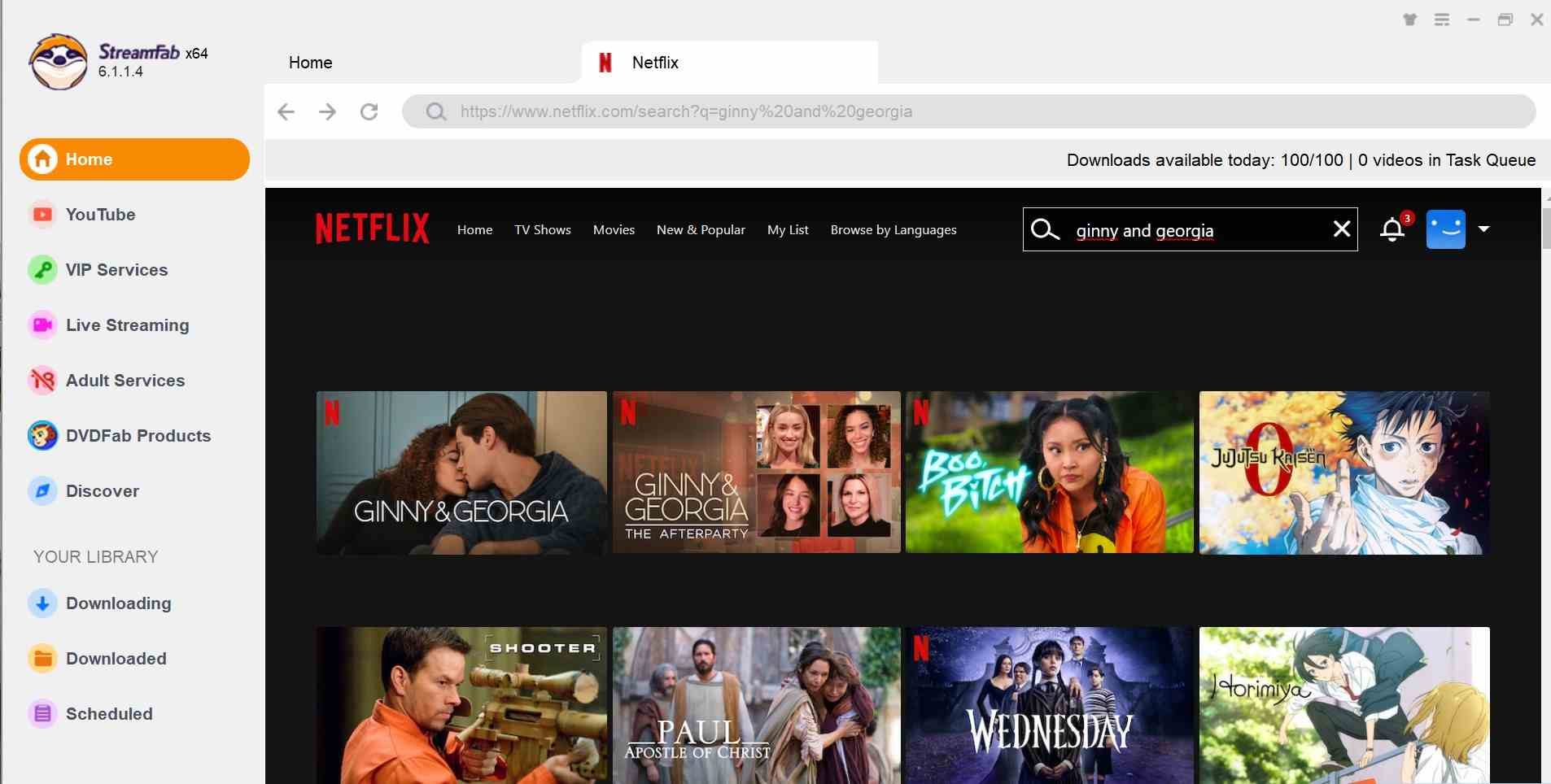
Step 2: When I select a movie or episode and click play, the downloader will automatically detect the video. A small window of settings will appear to choose the option I want, like resolution, audio streams, subtitles, and the type of output file. I can select many of them at once to download several episodes of a TV series.
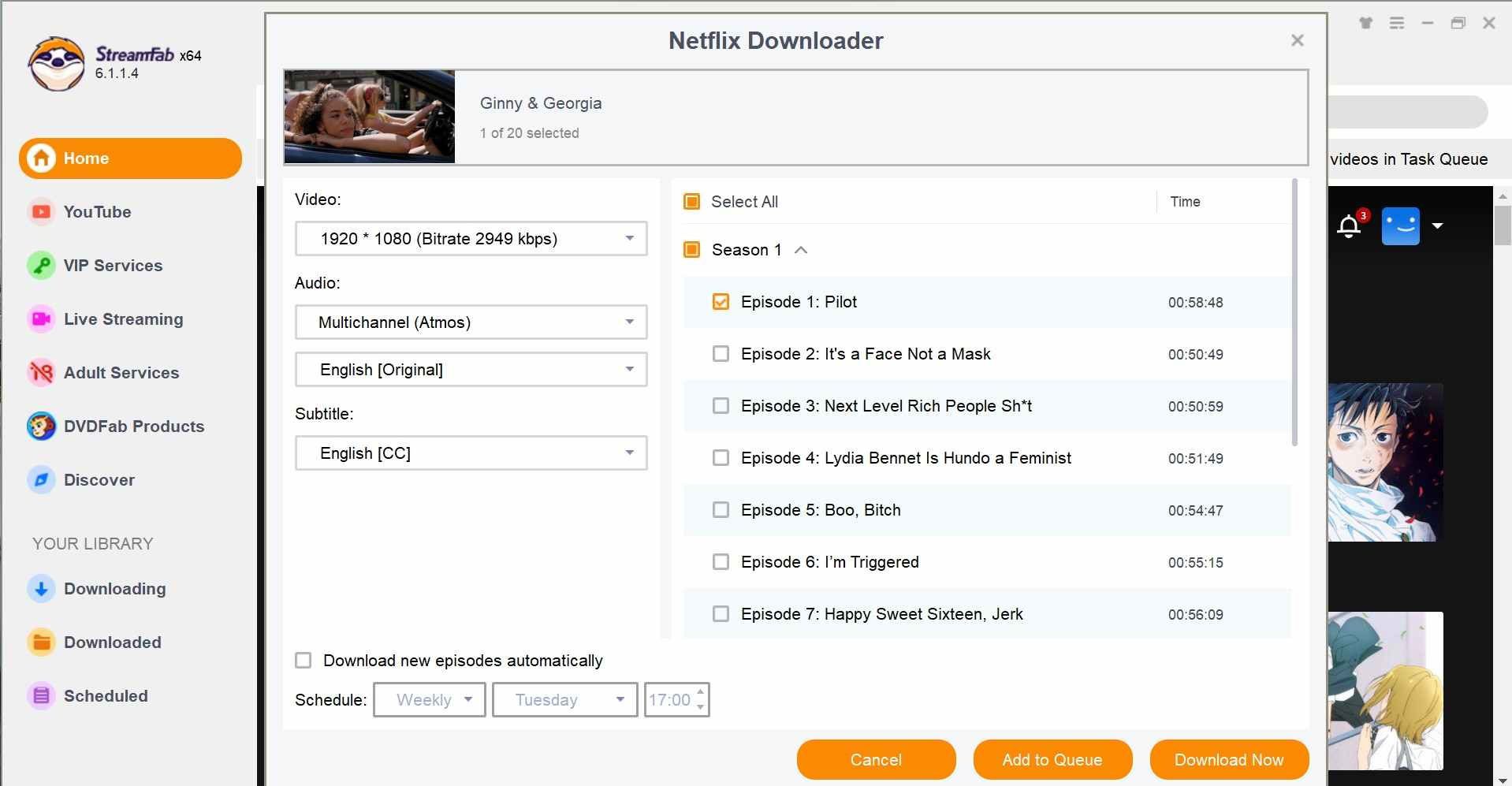
Step 3: After the settings are selected and confirmed, click download. I can see progress in the Downloading section. Once downloaded, there are files in the Downloaded tab.
What great is if an interruption causes a download to stop, the downloader may have to be stopped so that it can start again from the beginning, rather than retrieving the previously downloaded section.
The download speed appears fairly fast on average. Under an average 3-10 MB/sec download speed, it would take approximately 10 minutes for a standard 20-minute TV episode to download, even fewer in the best case when connected to an appropriate server. Max. Download support also appears for the most part to be satisfactorily good at 1080p as long as the source was available in this quality level, and the source title contained the original audio tracks and subtitles.
However, not everything can be downloaded at HD quality. When I was testing, some titles simply loaded at a reduced quality due to how the video is streamed in a browser, or within the legal limitations of DRM.
2. User Experience
As far as stability goes, StreamFab Netflix Downloader ranks mostly on the positive side. Speaking from the experience of most people, it is often stable and at least somewhat reliable to download from Netflix. Most first-time users had no trouble with the UI of the downloader, and batch downloading was mostly stable after initiation.
Another shared feature from user reviews is that StreamFab is very handy for offline use when you’re traveling. For those constantly on the road and under poor network conditions, tools like this are a must to compile that offline collection before departure.
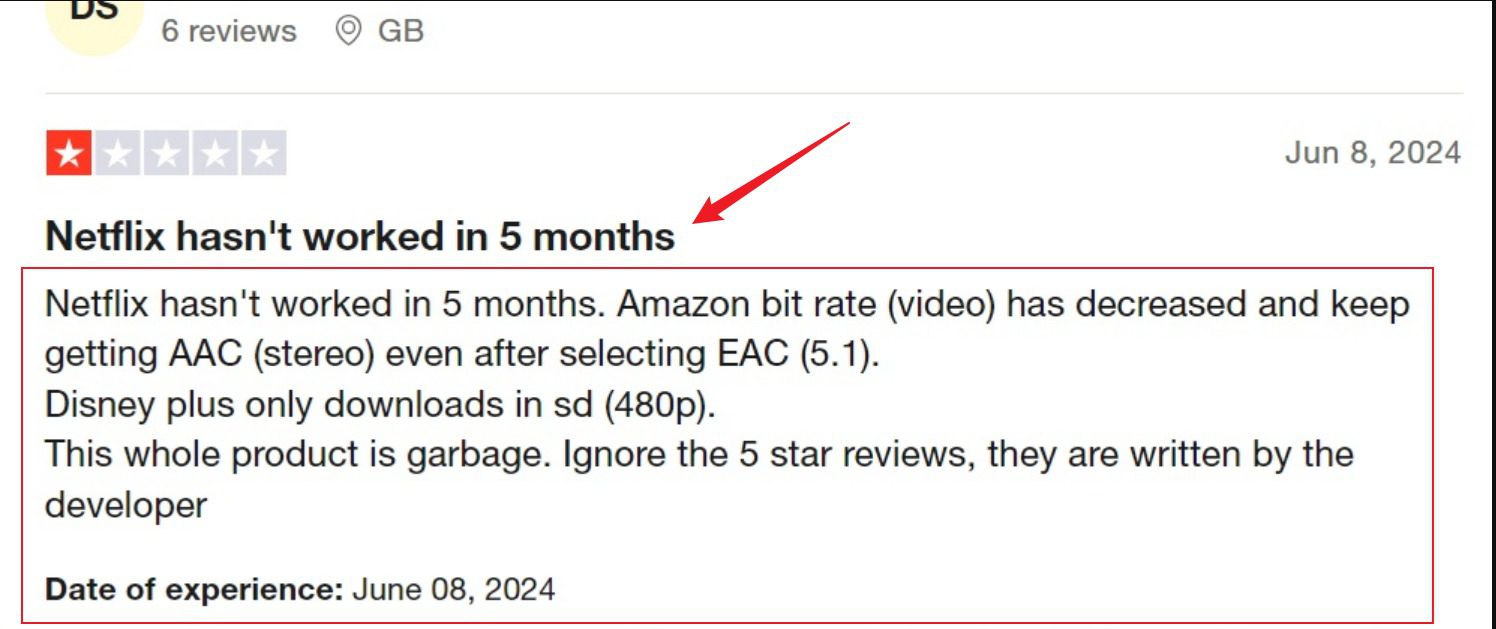
However, some users have encountered unstable results based on the title. Some of the videos expected to be available at higher resolutions only limited to less desirable levels, such as 480ps.
Verdict: Pros & Cons of StreamFab Netflix Downloader
During testing, features, and user reviews, though, StreamFab Netflix Downloader is in the middle. Let’s look at some of its pros and cons here.
Pros
- Saves videos as MP4 or MKV files
- Supports HD downloads up to 1080p (when available)
- Batch downloads for TV series
- Decent user ratings and overall usability
Cons
- Resolution isn’t consistent for every title
- Occasional download failures or DRM conflicts
- Software can feel heavy or unstable at times
- Paid software after trial
Better Alternative: Moyea Netflix Downloader
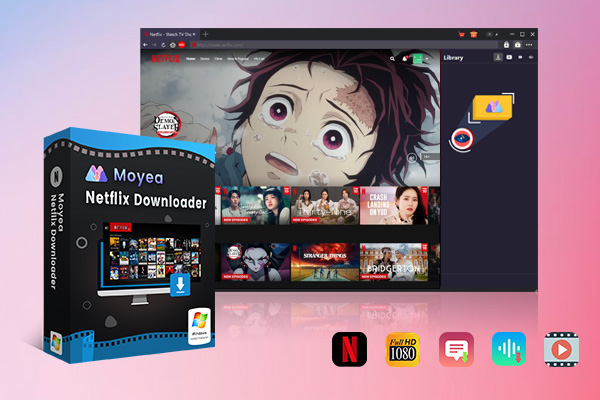
Now, if you are in search of a more reliable alternative to StreamFab, then Moyea Netflix Downloader is more reliable and dependable than StreamFab Netflix Downloader. With this tool, you can use a built-in browser to log in to your Netflix account and search for movies/shows.
Its download stability and control capabilities are another strength. The Moyea also has the advantage of GPU hardware acceleration to speed up downloads and offers the option to restart if a download is interrupted. This can be convenient if your connection goes down during a lengthy download. It can also store video metadata, including episode titles, posters, and cast information, making it easier to organize files into a personal media library. On the Standard with Ads plan, users of Netflix can view videos offline without ads, eliminating one of the biggest frustrations of the Ads-supported tier. All these reasons make Moyea Netflix Downloader a clear reliable alternative to StreamFab Netflix Downloader.

-
- Download Netflix movies and shows at up to 1080P without ads.
- Convert Netflix video to MP4/MKV file with original quality.
- Batch download multiple Netflix episodes across seasons.
- Reserve multiple subtitles and audio tracks for easier management.
1. Quick Comparison: StreamFab vs Moyea
In order to know where each tool stands, another approach could be to analyze it with real criteria, like the stability of the programs, how reliable they are when downloading, if they are worth it or not, etc. Although both tools intend to download movies on Netflix to watch in the offline mode, the actual performance and usability may vary in practice. Let’s look at all aspects in a comparison table below.
| Feature | Moyea Netflix Downloader | StreamFab Netflix Downloader |
|---|---|---|
| Stability | High — generally more consistent downloading workflow | Moderate — occasional bugs reported when streaming platforms update DRM |
| Download Success Rate | More reliable with fewer failed downloads | Inconsistent for some titles |
| Video Quality | Up to 1080p with stable output quality | Up to 1080p, but some titles may drop to lower resolutions |
| Download Formats | MP4 / MKV | MP4 / MKV |
| Batch Download | Yes | Yes |
| Interrupted Download Handling | Supports restarting interrupted downloads | Limited resume support |
| Ads in Downloads | Removed when downloading from ad-supported plans | Usually removed during download |
| Price Value | Generally, more cost-effective for a single Netflix downloader | Higher cost depending on bundle plans |
| Overall Experience | Focused, stable downloader with simpler workflow | Feature-rich but sometimes heavy or inconsistent |
2. How to Use Moyea Netflix Downloader?
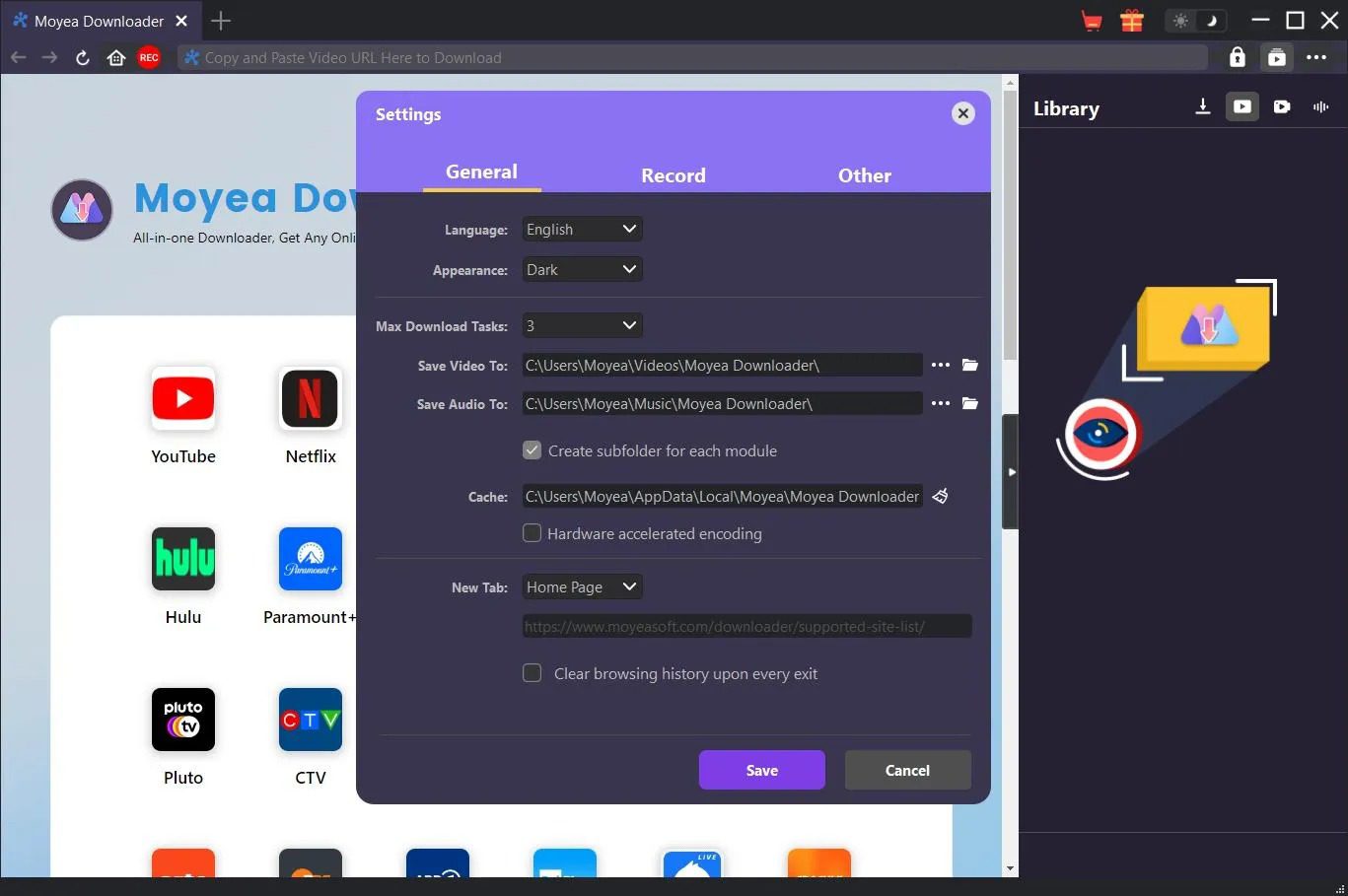
Step 1: Open Moyea Netflix Downloader. Choose the folder where you’d like to save your videos before starting the actual download. There is a three-dot icon located on the top right hand of the window, and by opening Preferences and clicking on the General tab, to access the Save Video To, then you will need to browse for and choose a location. When ready, click Save.
Step 2: Open the program and log in to Netflix with the built-in browser. There, you can browse or search as you would on Netflix. Click on the title page and the movie or TV show you desire to watch and start playing the video.
Step 3: When the video starts playing, select the Download icon. The program will examine the stream and present some of the download options, including the resolution, format, bit rate, and file size. Select the settings of your choice, and then you need to press the Download button to start saving the video.
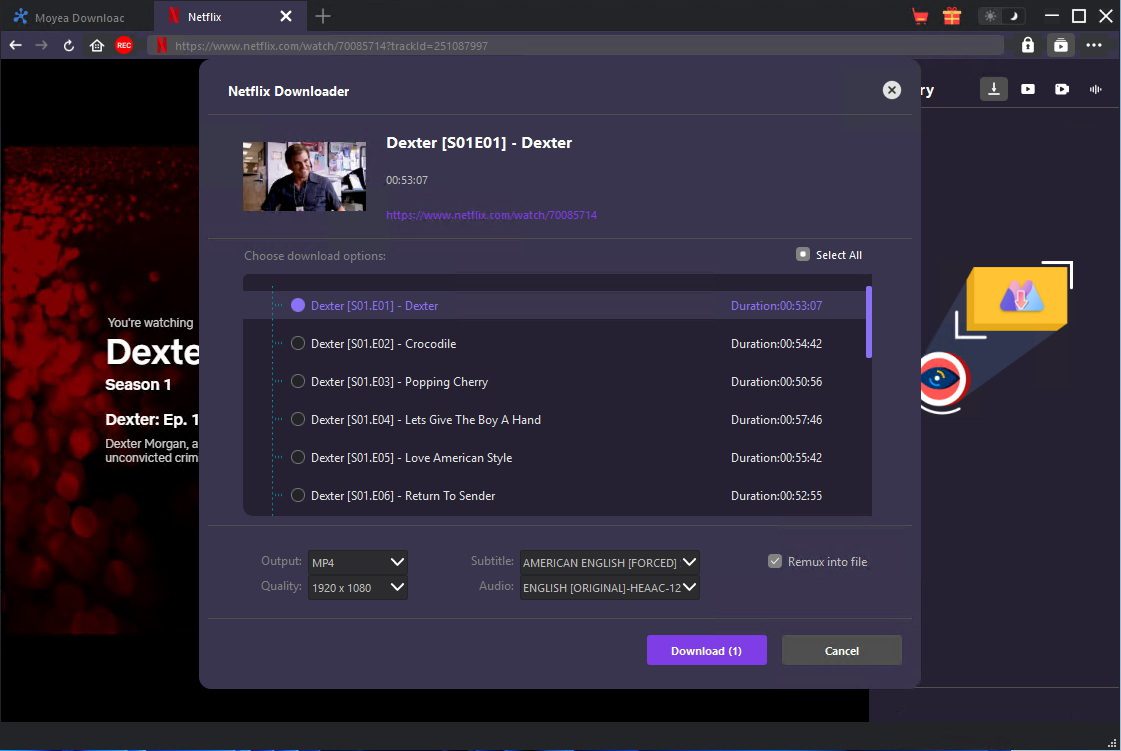
Step 4: As soon as the download begins, a task panel is seen on the right side of the interface. You can pause and resume your downloads here.
Step 5: Once the process is complete, the video will be displayed in the Downloaded Video tab.
That’s how simple it is to use. Now you can watch your favorite Netflix shows anytime anywhere.
Conclusion
So, yes, StreamFab Netflix Downloader offers several options for downloading Netflix movies and shows for offline viewing, including batch downloads, support for multiple subtitle languages, and compatibility with the most popular video formats. However, real-life performance varies by title, and download quality can be incorrect or unstable. On the other hand, Moyea Netflix Downloader can be a good alternative to users looking for a more focused and stable downloader. It offers quality downloads, batch support of episodes, resume support of interrupted downloads, and video saving in MP4 or MKV so that it can be easily watched offline. Overall, Moyea Netflix downloader offers a more realistic experience if the purpose is only to create a seamless offline library of Netflix content.
 Terms of Use: Moyea is intended solely for personal, educational, and non-commercial archival purposes use. It allows users to save a local copy of videos that they have legally subscribed or purchased. Any commercial utilization, unauthorized redistribution, or online sharing is prohibited. Users assume full responsibility for complying with copyright laws.
Moyea Netflix Downloader
 Try for Free
 Try for Free
 Download Netflix movies and TV shows to 1080P MP4/MKV;
Batch download entire seasons, series, or multiple episodes;
Download subtitles and audio tracks;
Pack subtitles into output video or save subtitles as SRT/SUP file;
Automatically remove ads during downloads.






 English
 日本語
日本語