Share article:


How Long Do Netflix Downloads Last on Your Device?

Updated: 2025-12-16
Related to: Moyea Netflix Downloader
37 Views
Summary:
- Netflix downloads are temporary and can expire due to licensing, region, or viewing limits. You can track expiration dates, organize downloads, or use tools like Moyea Netflix Downloader to enjoy offline content.
Netflix downloads aren’t permanent. The shows and movies on Netflix come with expiration dates. Some even disappear before your subscription ends or even the Netflix streaming license ends. Downloads work differently from streaming on Netflix. And rules and regulations for downloads can be confusing. Some titles can expire quickly. On the other hand, many titles stick around longer. If you are not sure about how long do Netflix downloads last, then keep reading. In this article, we will try to cover all aspects of Netflix download limits.
Quick AccessCLOSE
How Long Do Netflix Downloads Last?
No, Netflix downloads don’t last forever. The exact duration depends on different factors. There are things like the type of content, licensing agreements, and your region. Let’s understand this in detail below.
1. Standard Expiration for Netflix Downloads
There is no standard expiration period for Netflix downloads. Netflix downloads usually expire in 7 to 30 days. However, the exact timing can vary depending on several factors. On each show, Netflix usually adds a label when it is about to get removed from the Netflix platform. For updates, you can keep an eye on that. When a license is about to expire, Netflix will remove the title from your downloaded library.
Another important factor is that your viewing status affects your Netflix downloads’ expiration. For example, you downloaded one show or movie and once you started watching it, then Netflix will give you a 48-hour fixed window to finish it, and it will expire after that time. To watch it again, you need to renew it.
2. Why Netflix Downloads Expire?
The main reason behind Netflix’s expirations is licensing agreements. Netflix itself doesn’t own all the content it streams. So once the license period ends, downloads will expire too. Such shows and movies will be removed from Netflix and your content library.
When such titles expire, it allows Netflix to control content rights in various locations. Every Netflix title is subject to a different licensing agreement in various regions. Moreover, downloads also have time restrictions that are set from the moment you start viewing, generally about 48 hours, in order to avoid unlimited offline access. This is how Netflix can continue to offer a variety of new titles and still abide by the copyright regulations.
How to Renew Netflix Downloads?
Now, let’s move towards a little positive aspect after reading all about Netflix download limitations. A good thing is that you can renew Netflix downloads. It’s easy to renew your Netflix title. But please remember, Netflix also puts renewal limits on its downloads. We will discuss both aspects in detail below.
First here let’s see how you can renew your Netflix downloads.
Step 1: Open the Netflix app on your device and sign in. Please make sure your subscription is active; otherwise, you will not be able to renew.
Step 2: Next, go to your Downloads section and locate the expired title. On an expired title, you will see a mark or an unavailable label.
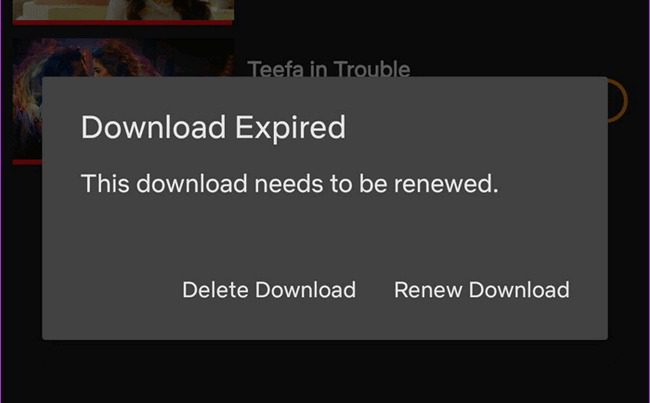
Step 3: You can simply click there to renew. If it did not work, then you can check if the title is still available for streaming in your region. If the title has been removed from Netflix, it cannot be renewed.
Step 4: If the title is available, simply click on the download button, and your show will start downloading again.
Just wait for the download to finish. Once complete, the title will have a new expiration period and will be ready to watch offline.
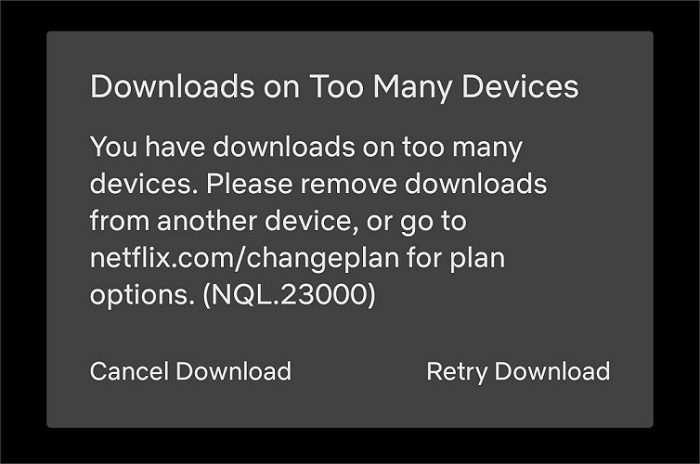
Now, let’s see what some limits of download renewal on Netflix are.
- The first limitation you will face is content availability. If Netflix no longer streams the title, you can’t download it.
- There are also regional limits. This means that a download that works in one country might not be available in other countries.
- Also, this renewal is limited by the rule of the maximum number of downloads per account. It’s based on your subscription plan. (Note: 15 titles for ad-supported plan, and 100 titles for ad-free plans.)
- There’s no one-click renewal, and each expired download must be manually re-downloaded. So, you need to have an active internet connection to refresh your downloads.
Tips to Manage Your Netflix Downloads
It’s good to manage your Netflix downloads to avoid clutter. With proper organization, you can manage favorite content available offline. Here are some points that you should keep in mind.
1. Check Expiration Dates
Many downloaded contents last for weeks, but some many expire after 48 hrs. Keeping an eye on the expiration date will help you avoid situations where a favorite show disappears before you even watch it.
2. Sort and Remove Downloads
Also, with time, all your downloaded titles can pile up in your downloaded library. And all these downloaded items will take up significant storage on your device. So, make sure to regularly delete stored items that you have already watched. Also, you can organize content by recently added, title, or expiration date. These small, simple habits will help you focus on the content you actually want to watch while making your device run more efficiently.
3. Use Third-Party Tools to Save Netflix Downloads Permanently
If you want to keep Netflix content permanently, you can use third-party tools to download all your favorite content at once. Once downloaded, your content will stay on your device forever, and there will be no more worry of download limitations. To download all your favorite shows, you can use Moyea Netflix Downloader. With its built-in browser, you can download your favorite shows and movies with just a few clicks. Let me quickly show you simple Steps to download Netflix content with Moyea:

-
Professional Netflix downloader to download Netflix movies and TV shows at up to 1080P and save multiple subtitles and audio tracks as needed.
- Download Netflix video to MP4/MKV files.
- Batch download Netflix episodes of all/certain seasons.
- Remove ads in your downloads.
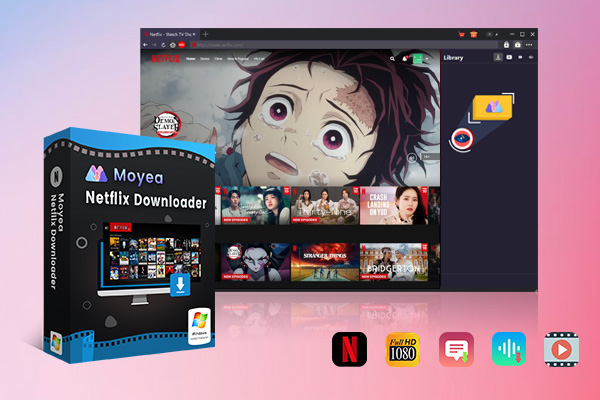
Step 1: Use Moyea’s built-in browser to access Netflix. Use your Netflix account email and password to sign in.
Step 2: Then look for the movie or show you want to download and click play
Step 3: Click the download icon, and Moyea will analyze the video and display a pop-up window to you.
Step 4: You can choose your download options (format, resolution, audio/subtitles) and start downloading.
FAQs
Q1: Can I watch Netflix downloads after my subscription ends?
No, you cannot. The downloaded content will be deleted once your Netflix subscription is no longer valid. In other words, you have to maintain a subscription if you want to watch downloaded Netflix movies and series.
Q2: Can I transfer Netflix downloads to another device?
No, not through the native Netflix download method. If you want to move your Netflix downloads files on another device, you can use Moyea Netflix downloader to save your movies and TV shows in MP4 or MKV format. After downloading, you are free to transfer your files to whichever device you want.
Q3: How do I know when a download is about to expire?
Netflix will display a countdown timer for each downloaded title in your library. Some titles may also have messages like “Available for X more days,” which helps you plan when to watch or renew.
Conclusion
Netflix downloads are a very nice and convenient way to watch shows and movies offline. But this feature comes with expiration rules and limits. You can keep track of your downloads to have a better understanding. However, in case you want to download and handle your most liked content offline, we suggest that you just download your favorite Netflix content by using Moyea Netflix Downloader. By using this tool, you are free from the Netflix download limitation once and for all.
 Terms of Use: Moyea is intended solely for personal, educational, and non-commercial archival purposes use. It allows users to save a local copy of videos that they have legally subscribed or purchased. Any commercial utilization, unauthorized redistribution, or online sharing is prohibited. Users assume full responsibility for complying with copyright laws.
Moyea Netflix Downloader
 Try for Free
 Try for Free
 Download Netflix movies and TV shows to 1080P MP4/MKV;
Batch download entire seasons, series, or multiple episodes;
Download subtitles and audio tracks;
Pack subtitles into output video or save subtitles as SRT/SUP file;
Automatically remove ads during downloads.
Related

StreamFab Netflix Downloader Review: Features, Pros & Cons

Netflix Not Working on Roku? Solve It Now

3 Proven Ways to Watch Netflix Without Ads

How Netflix Extra Members Change Account Sharing?

How to Log out of Netflix on TV? Easy But Secure Methods Here
Netflix Watch History: Can You Clear or Hide It?


 English
 日本語
日本語