Share article:


Crunchyroll Offline Viewing for Travel: How to Watch Anime Without Internet

Updated: 2026-02-12
Related to: Streaming Video Recorder, Video Downloader
24 Views
Summary:
This article introduces 3 methods for users to save on Crunchyroll for offline viewing. Users can also have your questions answered in this article.
MenuCLOSE
Crunchyroll is a streaming service with abundant anime resources. Users can find most of their favorite anime on Crunchyroll. However, it’s hard to ensure that you are always in a place with network, some of you may wonder can you watch Crunchyroll offline? The answer is positive. Offline download can circumvent issues caused by weak net-work and offer a smooth viewing experience, and you can watch your favorite anime even on plane. This article will take you through three methods for Crunchyroll offline viewing and offer you a better viewing experience.
Method 1: Download Anime with Crunchyroll’s Official Offline Feature
Crunchyroll provides official offline download feature, so users can both watch anime online and download anime you want to watch through this feature. In addition, Crunchyroll has integrated with Funimation, which means users can have access to more contents in one platform. And users can download Funimation anime through the official offline download feature. Here are steps on how to download on Crunchyroll:
1) Open Crunchyroll on your device and log into your account.2) Locate the anime you want to watch. Click on the specific episode you want to download, then click on the download icon.
3) Once the series is downloaded, you can find the content in the resource management library of your account and watch it.
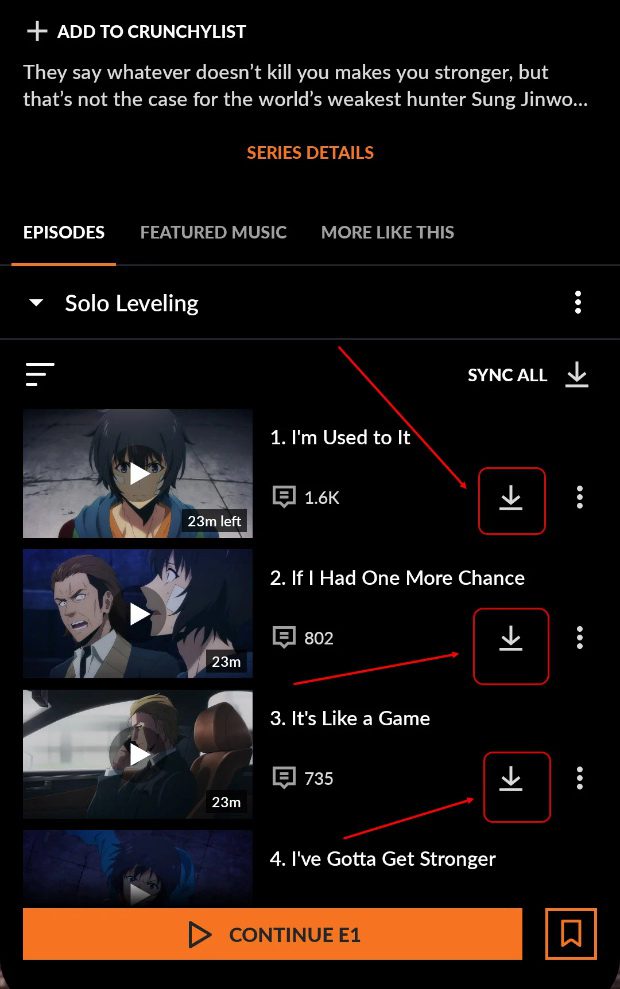
But the official download feature has certain limits that users should pay attention to:
Limitations
- Crunchyroll offline viewing is only available to users who subscribe its premium plan. This may generate extra fees for those who are budget-sensitive.
- Not all episodes can be downloaded. The copyright licensing varies across different regions, which means some of your favorite content cannot be downloaded in your region.
- The downloaded episodes will not be able to play offline after 7 days if they are unwatched.
- You can only download crunchyroll episodes for offline viewing through your mobile devices.
Method 2: Screen Recording Crunchyroll Anime
When you can’t download the anime you want to watch through the official offline download feature of Crunchyroll, screen recording is a feasible alternative. Moyea Streaming Video Recorder is an ideal solution that can capture various online video content with high efficiency. Its core features include:
1) It can record content from all platforms, including DRM-protected content.
2) It can record with multispeed (up to 5 times the normal speed).
3) Supports background operation and ad filtering.
4) It can be output in MP4/MKV format at 4K resolution.
Now, we will introduce to you how to screen record Crunchyroll through it:
1) Open Moyea Streaming Video Recorder and visit Crunchyroll through the built-in browser.
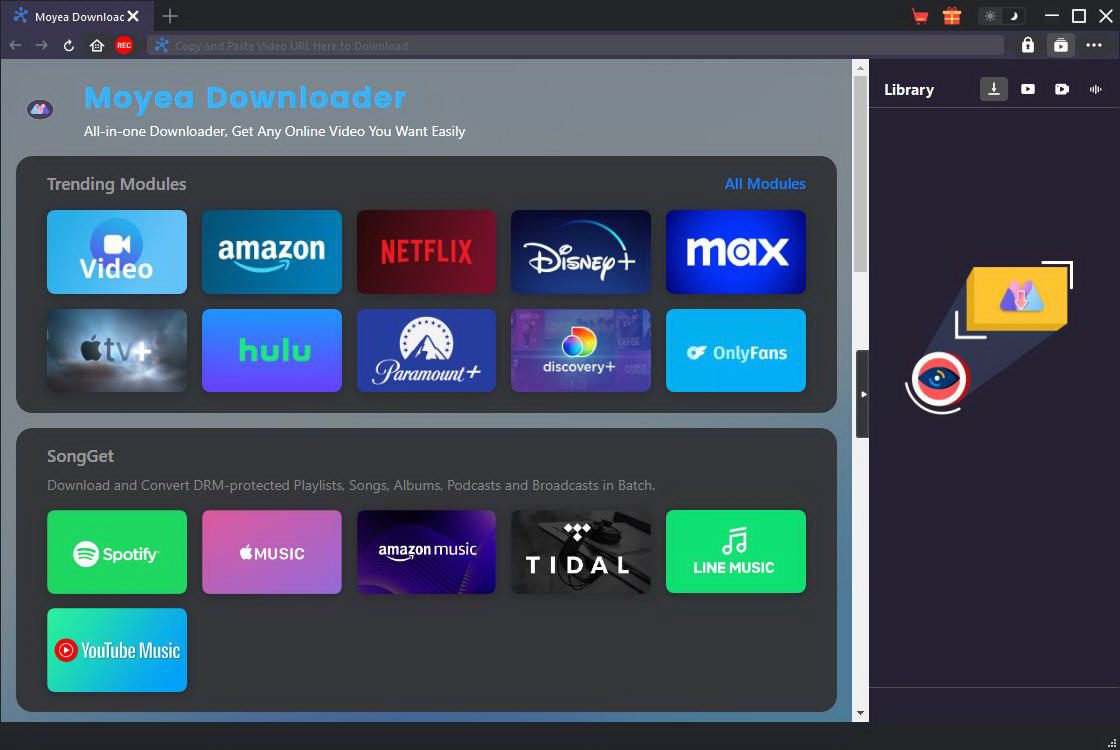
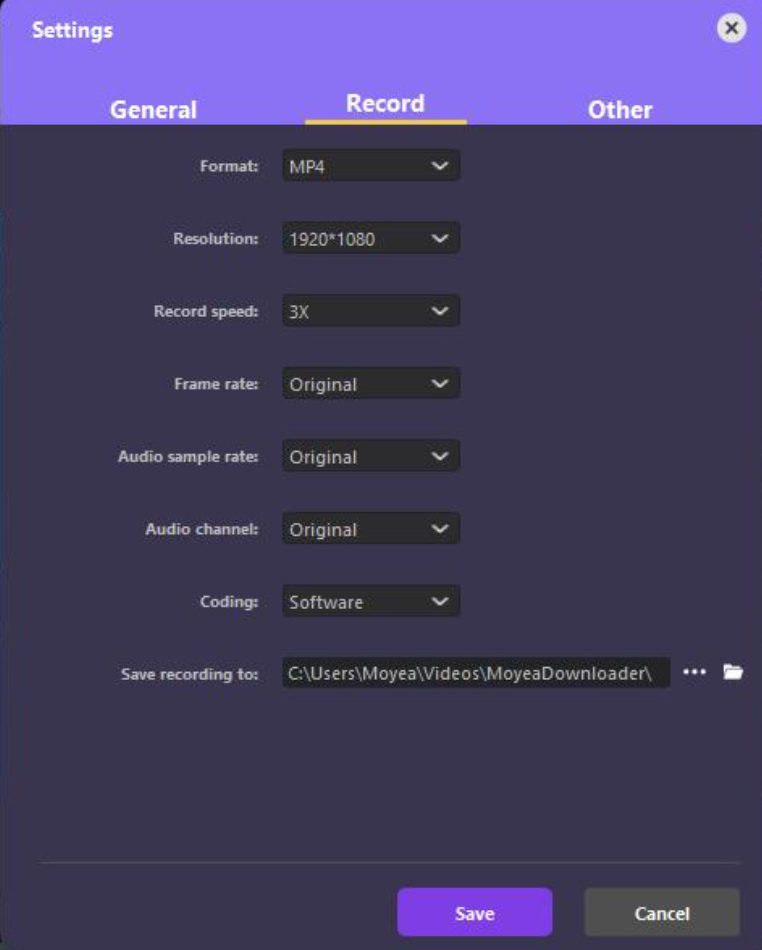
2) Log into your account and find the anime you want to record. You can set the parameters according to your preferences in advance.
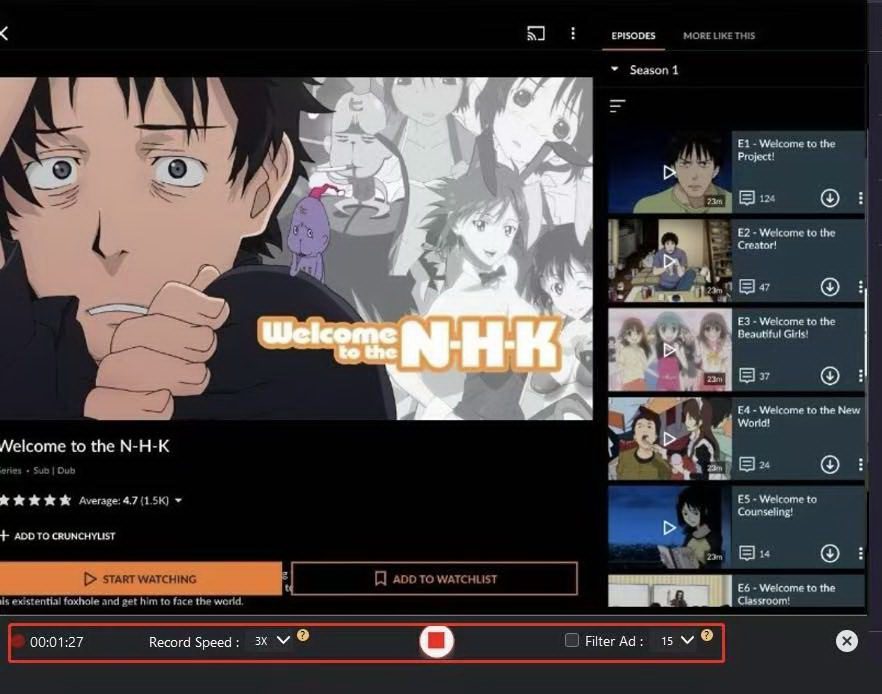
3) Once the video plays, the software will automatically detect it and locate the recording area. Click the red button to start. When the recording is end, click it again to stop.
4) After the recording is completed, the video file will be saved to the preset filer. You can also find it in “Library” on the right side.
Method 3: Downloading Crunchyroll Anime for Offline Viewing
When you need to download videos in bulk or want to save some time, Moyea Video Downloader offers an efficient solution. Moyea Video Downloader is a professional online video download tool that supports batch downloading of video content from over 1000 streaming websites. Here are its key features:
1) Supports downloading videos and live streams from over 1000 websites.
2) The video can be output at 8K resolution, and in common formats such as MP4/MKV.
3) Users can download in batch.
4) It has built-in ad filtering feature.
Here is how to download for offline viewing Crunchyroll through this software:
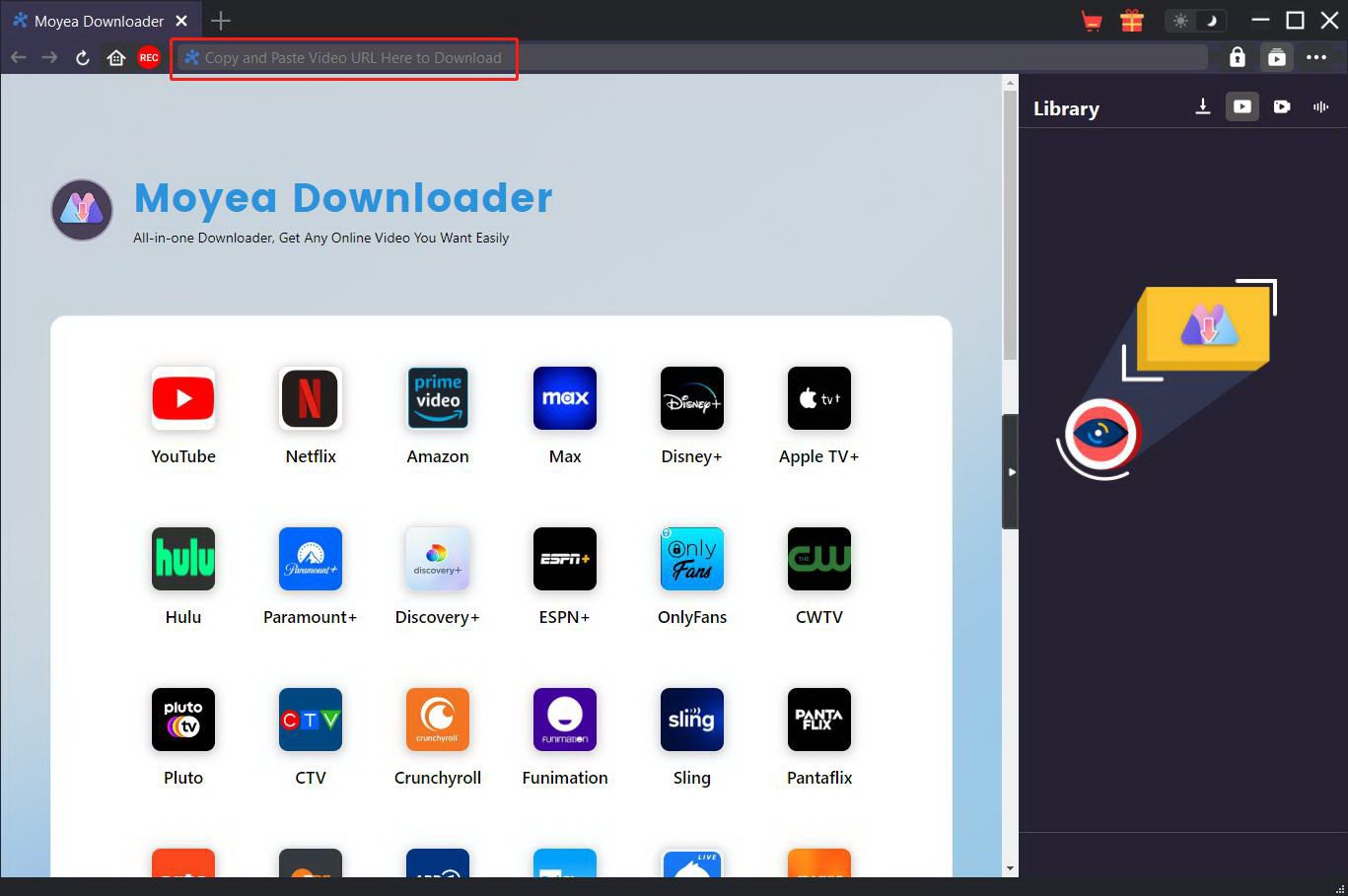
1) Open Moyea Video Downloader, and set the parameters according to your preference.
2) Visit Crunchyroll via browser, and find the anime you want to download.
3) The software will display the download options. Then click the “Download” button to download the video.
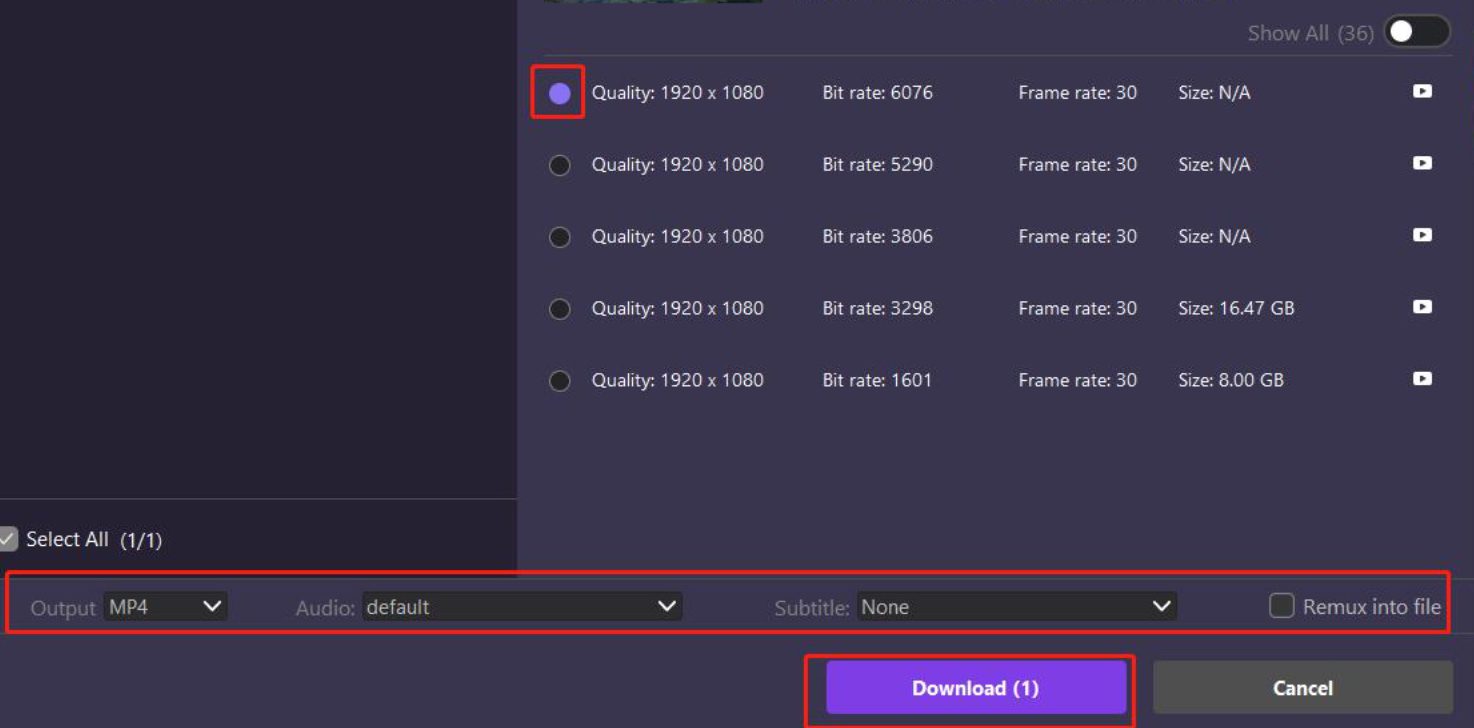
5) After the download is complete, all the video files can be found in your file.
Troubleshooting: Fix Common Official Offline Viewing Issues
1. Downloads Not Playing Offline
The download feature is only included in premium plan. If the subscription expires, the downloaded content won’t be able to play as well. In some cases, the content will be affected by storage damage. You can try to delete the content and download them again to fix it.
2. Download Button Missing
Verify if you have a valid Premium subscription. Free plan does not offer the download feature, so you may not be able to see the button. If you have subscribed to the premium plan but still can’t see the button, that may because the content is not able to download in region due to the regional copyright licensing. But sometimes, the missing button may be caused by a system malfunction. You can try to close the app and start it over to solve the problem.
3. App Asking to Reconnect
Crunchyroll will periodically verify the subscription status of users to ensure the usage rights. You need to connect to the network and log in your account to complete the verification. If the problem persists, please try reinstalling the latest version of the application.
4. Downloads Disappeared or Became Unavailable
If your Premium subscription has expired, all the downloaded content will be locked or disappear. After restoring the subscription, you can access these contents again. According to the copyright agreement, the offline viewing rights for some anime content have time limits. After the authorization expires, the downloaded content will may become unavailable.
FAQs
1. Do Crunchyroll downloads work in airplane mode?
Sure. Crunchyroll’s official offline feature allows users to watch the downloaded content without any internet connection, including when in airplane mode or in an area with no signal. Please note that although the viewing process does not require an internet connection, some episodes may need internet for DRM verification when first played. After the verification is completed, they can be played smoothly in airplane mode.
2. Why is the download button missing for some time?
Firstly, only users who subscribe to Crunchyroll’s premium plan can download its content. If the subscription has expired, the download button will miss. Moreover, some anime may not offer download option due to the copyright licensing in different regions. If you find your favorite anime can’t be downloaded, you can solve this by tools like Moyea Streaming Video Recorder and Moyea Video Downloader.
3. Does watching offline use mobile data?
No. Offline viewing Crunchyroll will not take any mobile data. But please note that the process of downloading the anime requires a network connection. Therefore, to save your mobile data, you can download the anime when connecting a Wi-Fi network.
4. Does Crunchyroll offline viewing support subtitles and language settings?
Yes. The subtitles of the anime will also be kept during downloading. And you can change different languages in settings.
 Terms of Use: Moyea is intended solely for personal, educational, and non-commercial archival purposes use. It allows users to save a local copy of videos that they have legally subscribed or purchased. Any commercial utilization, unauthorized redistribution, or online sharing is prohibited. Users assume full responsibility for complying with copyright laws.
Streaming Video Recorder

 Try for Free
 Try for Free
 Record live streams, videos, and clips from 1000+ websites.
Record DRM-protected streaming videos.
Save recordings as MP4 or MKV files.
Record videos in up to 4K resolution.
Record videos at up to 5× speed.
Skip commercials during recording.
Related

How to Record on Sling TV — More than DVR
How to Save YouTube Videos as MP4 Files
Apowersoft Streaming Video Recorder Review: Features, Pricing, and Alternatives

YouTube TV DVR: How It Works and How to Record Live TV

How to Record Your Favorite Shows on YouTube TV
RecordFab Review: Is It Really Worth The Price?


 English
 日本語
日本語