Share article:


AnyStream Review After Shutdown & Best Alternative

Updated: 2026-02-28
Related to: Moyea Downloader
40 Views
Summary:
- AnyStream was a great tool for downloading videos from different websites. However, can you still use AnyStream? This post will tell you everything you need to know about it, including how it was shut down, what its top replacements are, and more.
Many streaming apps are created and then discontinued. AnyStream was a great tool for downloading videos from Netflix, Disney+, Amazon Prime, and Hulu. However, now this program doesn’t work. After it was shut down, many people started looking for a similar website to download content and watch it offline. This post will explain why this tool stopped working and suggest some alternatives that work better. If you need movies, series, or playlists to watch offline, something might be missing in your life. Let’s take a look.
OutlineCLOSE
Briefly Know About RedFox AnyStream
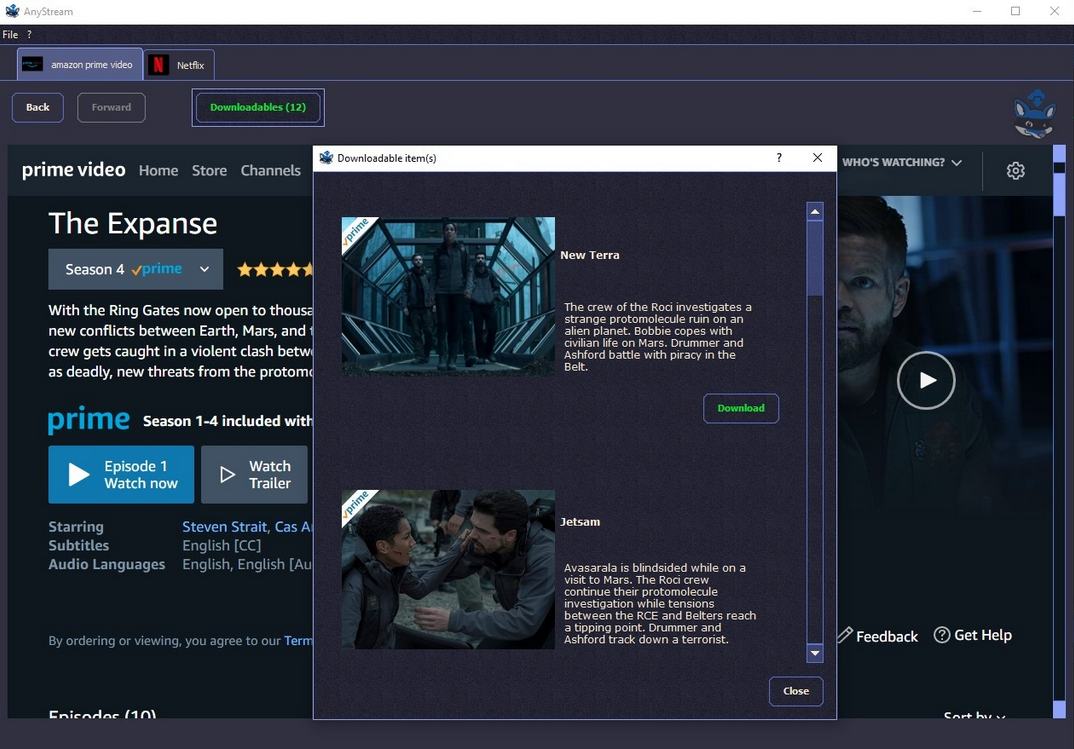
RedFox AnyStream was one of the best tools for saving streamed media. It was first used to save movies and shows from streaming sites like Netflix, Disney+, Hulu, and Amazon Prime for online watching. There were a number of ways to make it your own, and it was fairly easy to use. It also has a unique feature that allows you to download content in high quality without losing the subtitles and audio tracks.
Key Features:
- Download movies and TV shows from multiple streaming platforms
- Save content in HD or 4K quality
- Preserve subtitles and multiple audio tracks
- Batch download full seasons or playlists
- User-friendly interface with simple setup
- Compatible with Windows and macOS
Is RedFox AnyStream Really Down?
At one time, this could be downloaded from Netflix, Disney+, Hulu, and Amazon Prime by pretending to be how they sent their streams. Since these streaming services have upgraded their DRM protection, AnyStream stopped working. AnyStream developers have completely abandoned any further development and updates to the software. Eventually, the app became outdated, and every attempt to use it met the walls raised by updated DRM systems on major streaming sites. Below are some common problems that users report.
common Problems
- Downloads fail to start or complete
- The tool will hang or crash when parsing titles
- Many times, subtitles or audio tracks are missing or incorrect
- Content shows up as unplayable or corrupted after download
- Streaming services aren’t recognized or accessible within the app
In short, AnyStream is not just ‘temporarily broken’. All its core methods are not patched against current platform protections, and most users could no longer make it work. Therefore, these are the primary reasons why people look for useful alternatives nowadays.
Best AnyStream Alternative – Moyea Downloader
If you want something that works 100%, then Moyea Downloader is the top alternative to AnyStream. Not only does it support extra streaming sites, but it also delivers wider format choices. High-quality video downloads come standard, while subtitles and sound stay fully included. Metadata doesn’t get stripped along the way either. Need several episodes fast? Grab them together using bulk download mode. Faster performance comes from built-in GPU support, along with fewer crashes. A steady download flow is what sets Moyea apart – something AnyStream never quite managed.

-
- Download live streams, on-demand movies, TV series and other videos from 1000+ websites.
- Support to download videos in batches at up to 8K resolution without ads.
- Pack captions into output video file, or save captions as independent SRT/SUP files.
- Record online videos at up to 4K as MP4 or MKV files.
- user-friendly built-in browser and muitilingual UI settings.
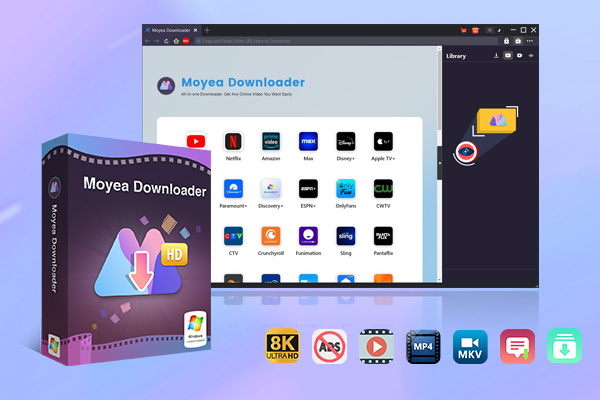
1. Core Advantages Over AnyStream
Moyea Downloader boasts many benefits over AnyStream. First, AnyStream has very limited support, while Moyea could interact with more than 1000 streaming sites. This tool allows grabbing content from Netflix and Disney+, and many other less popular niche sites. The output flexibility is another area of expertise. Moyea downloader supports MP4, MKV, and AVI, among others, for video downloads and customizable quality up to 4K, which is not available in AnyStream.
Handling of subtitles and audio tracks is better, too. Moyea could retain multiple audio tracks and subtitles. By contrast, subtitles are poorly extracted using AnyStream. On the other hand, the updates for this software come frequently, proving it to be a more compatible option with the evolving streaming platforms in the long run.
2. Better Performance Than AnyStream
Performance-wise, Moyea eliminates the problems that AnyStream users have to face regularly. What did not work during AnyStream downloads was completed on Moyea. Batch tasks run faster and more stably, without interruptions that force users to start all over again.
User experience also gets an upgrade since Moyea allows resuming interrupted downloads, auto power-off after finishing tasks, metadata preservation, and all features that make organizing a video library much easier in terms of speed and reliability compared to AnyStream. Moyea is an upgrade in every possible way. Below I will quickly show you how these both tools work when we try to use them.
Steps to Download Videos with Moyea Video Downloader:
Step 1: First of all, open Moyea Downloader and load the required video.
Step 2: After that, you could click the download button in the bottom right to let Moyea grab the streaming data. (Or choose the red button in the upper left corner for video recording.)
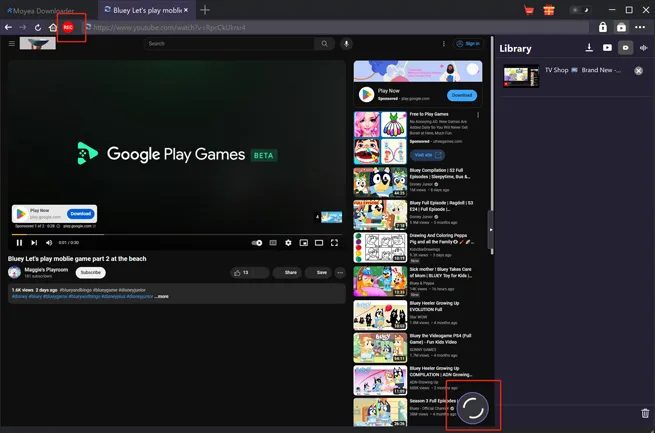
Step 3: Next, select the option to save, and in this case, the file format and resolution are essential. (Or adjust the recording settings if you would like to record videos.)
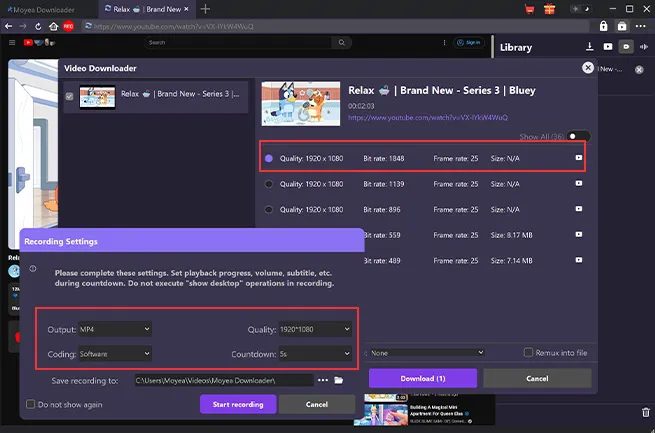
Step 4: Finally, hit go and let it pull the file straight through.
Comparing Steps to Download Videos with AnyStream:
Step 1: Start with opening AnyStream, choosing a saving location, renaming the file, and setting the download speed.
Step 2: Then go to the Netflix section, log into your profile, and find the show or movie you want to download.
Step 3: Next, in the menu you could choose picture quality, spoken language, and subtitles.
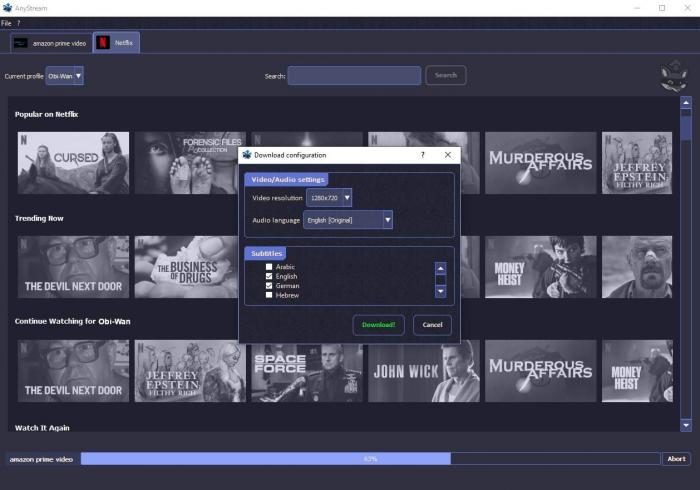
Step 4: Finally, click the Download button so that the process should start to store the content locally.
As we can see, Moyea downloader is super easy to use with very functional features in comparison with AnyStream usage steps. User-friendly interface makes it the favorite of users. If fast access matters, Moyea steps in without delay. Overall, it’s a reliable alternative to AnyStream.
FAQs
1. Is Moyea Downloader free to use?
Yes, it has a trial version, but for all the advanced features you have to buy it.
2. Can I Use Moyea Downloader to save videos from any streaming site?
Yes, it is compatible with thousands of streaming sites. It’s compatible with many popular sites like Netflix, Amazon Prime, Hulu, etc. On the platforms that are not compatible, you could record it.
3. Is Moyea Downloader Safe to Use?
Yes, as long as you download the program file from official websites, it would be totally safe to use without risks.
Conclusion
AnyStream is no longer available, so people need an alternative they could trust. Moyea Downloader stands as an extremely reliable alternative. Not only does it handle extra streaming sites, but it also delivers crisp video output while staying stable. Thanks to the built-in GPU boost, grabbing multiple files at once feels effortless. Subtitles stay intact, details remain untouched. Almost any online source becomes reachable through this tool, making it a reliable option to download videos from almost anywhere.
 Terms of Use: Moyea is intended solely for personal, educational, and non-commercial archival purposes use. It allows users to save a local copy of videos that they have legally subscribed or purchased. Any commercial utilization, unauthorized redistribution, or online sharing is prohibited. Users assume full responsibility for complying with copyright laws.
Moyea Downloader
 Try for Free
 Try for Free
 Download online videos in up to 8K resolution
Save streaming videos as MP4 or MKV files
Download videos from multiple popular streaming platforms
Batch download multiple videos at once
Support fast and stable video downloading with high compatibility
Related




 English
 日本語
日本語