Last updated on 2026-01-22, by
How Many People Can Watch Hulu at Once? Tips for Unlimited Streams
What this guide covers:
- Hulu Live is family-friendly, but its streaming restrictions can annoy multiple users. Knowing the number of devices that could be watched simultaneously helps to prevent interruptions.This guide will help you figure out the number of users who can stream Hulu at the same time and the options to increase that number.
Nowadays, streaming has become a part of the evening activities of most households. However, it may be problematic when there are more than two family members or roommates who want to watch various shows at the same time. Without enough simultaneous streams, someone always ends up waiting. Being aware of the number of devices that can be used to watch Hulu Live simultaneously keeps everyone entertained and does not create unnecessary distractions or breaks. In this article, we will cover the number of users who can stream Hulu Live simultaneously, the maximum standard streaming, and the options to increase the number of simultaneous viewers.
Quick AccessCLOSE
How Many People Can Watch Hulu at Once?
In many households, the whole family wants to watch different stuff at the same time. Standard Hulu allows streaming of two screens at the same time, though multiple profiles are available. Each user can create up to seven profiles, but only two people can watch at the same time. You can log in on as many devices as you want; however, the two-stream limit still applies. Some add-ons like HBO or Cinemax can allow up to five streams, but only three streams when you are away from your house. In case you require more than two streams, the official solution is Hulu + Live TV with the Unlimited Screens add- on. Otherwise, people have to take turns or use separate accounts.
What Happens When You Hit the Limit?
Reaching a stream limit at Hulu is not such a problem that you lose your account or lose money. In case two people are watching, the third person cannot begin a show. You will receive a message that the maximum number of screens is being used. One must pause, subscribe to the same stream, or wait until a slot is available to watch. It is only about control of who views what.
How to Check and Control Your Active Streams?
It is a good idea to keep an eye on the devices that are using your Hulu account. Hulu allows you to do this at the Manage Devices section of your account settings, where you can check and unsubscribe from the existing devices. Here’s how to do it:
Step 1: Go to Hulu. com and log in. Then, click on your profile icon and select Account.
Step 2: Click Manage Devices below.
Step 3: You will have the list of all the devices connected to your account and the dates when they were turned on.
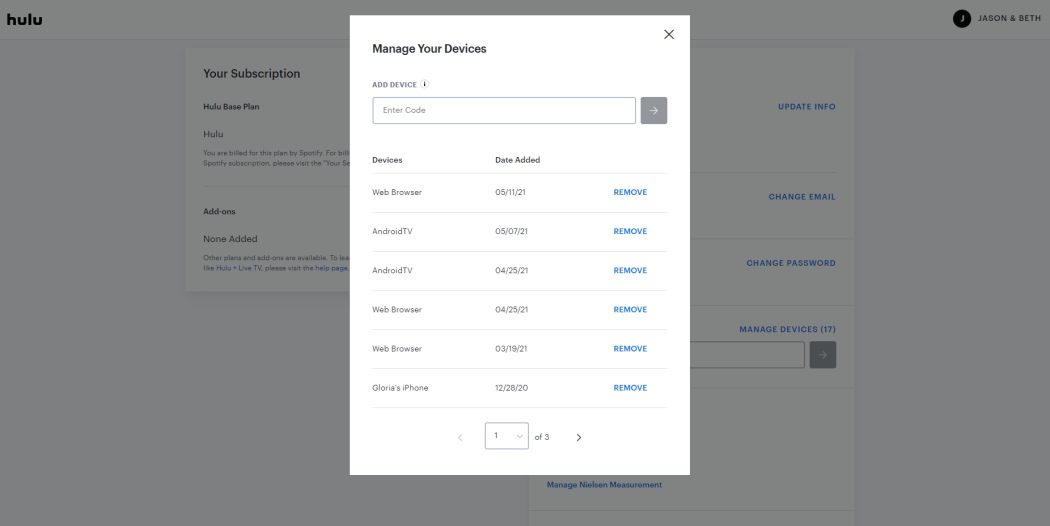
Step 4: Click on the Remove button beside any device that you do not know or that you do not use. This will free streams, and your account will be secured.
Tip: Once you have cleared the unknown devices, change the password. This will ensure the devices that are in use are only connected. It will also avoid any sudden blocks in streaming.
Smart Solutions for More Streams
When the need of the household is more than two streams, then there are some easy methods of achieving additional streams without much trouble.
1. Upgrade Plans for Unlimited Screens
The simplest solution when the entire family wishes to watch something different is the Unlimited Screens add-on to Hulu. It is not free, but it is the easiest way out. Hulu + Live TV subscribers are the only ones who can use this feature. Unlimited Screens also offers the two-screen limit at home (with an additional fee of $9.99 per month). You may stream on any number of devices that you like within your home network, and three devices when you are out of your home. Here is how to add Unlimited Screens:
Step 1: Open your browser and sign in to your Hulu account.
Step 2: Navigate to Account, then find Manage Add-ons or Manage Plan.
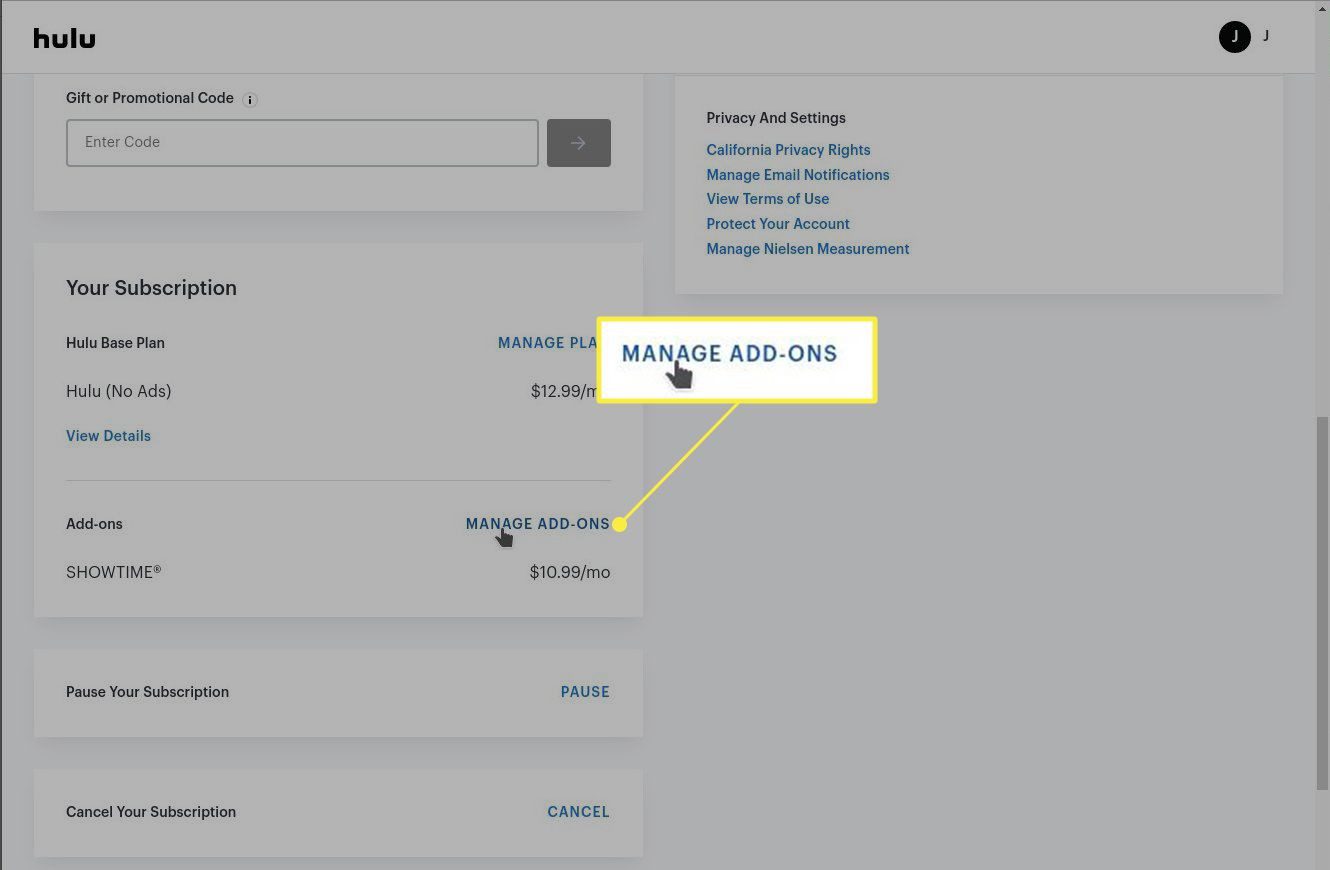
Step 3: From the add-ons list, select the Unlimited Screens option.
Step 4: Subscribe by following the prompts. Pay the additional fee, usually around $9.99/month.
After adding it, you can stream Hulu + Live TV simultaneously on as many devices as your home network supports. When you are away from home, you can stream at the same time on 3 mobile devices.
Limitations of Unlimited Screens:
- Live TV Only: Unlimited Screens works only with the Hulu + Live TV plan, which is not an option for basic Hulu on-demand plans.
- Premium Channels: Some add-ons like HBO Max and Cinemax have a limited number of streams. For example, you can stream HBO through Hulu on up to five devices at the same time at home, while only three of those streams can be on mobile devices if you are outside the home.
- Extra Cost: The add-on is at an additional monthly charge (almost $9.99 currently).
- Three Streams On-the-go: You can stream on up to three separate mobile screens when you’re traveling.
If you don’t have, or aren’t interested in, a Hulu + Live TV subscription, another option is to create a second Hulu account. Each Hulu account allows up to two simultaneous streams, so having two accounts lets you stream on four devices at the same time.
2. Download Hulu Videos for Offline Viewing
The Hulu mobile application enables you to save movies and TV shows for offline watching on your smartphones and tablets without an internet connection. It is especially useful while you are on a trip, commuting. However, Hulu download limits and the two-user streaming limit still apply to the viewing of downloaded content. In this case, you can try using third-party Hulu downloaders. Since downloaded videos are saved locally and viewed offline, they don’t count against the 2-screen streaming limit on Hulu, making it an ideal solution for a family.
Moyea Hulu Downloader is such a powerful and reliable third-party tool that is designed for those who want more downloading features than the official Hulu download option offers. The downloaded videos can be saved in MP4 or MKV format, so you can watch it on multiple devices besides the Hulu app.

-
- Download Hulu shows and movies to MP4/MKV videos.
- Support to download Hulu episodes of all/certain seasons in batches.
- Pack subtitles into output video file, or save captions as independent SRT/SUP files.
- user-friendly and muitilingual settings.
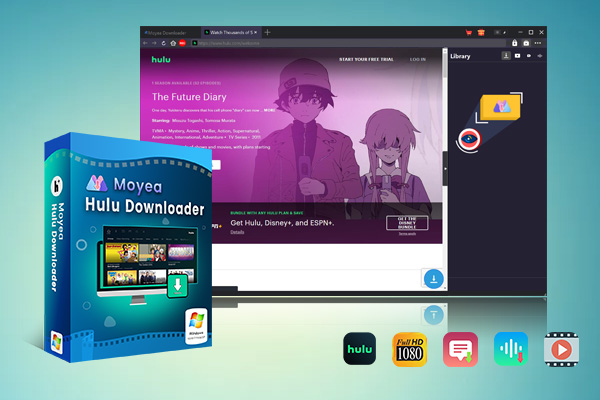
Below are the simple steps for downloading Hulu movies and shows with Moyea Hulu Downloader. Before that, download and install Moyea Hulu Downloader on your computer.
Step 1: Set Output Directory. Open Moyea Hulu Downloader, go to the Settings panel, and press the three-dot option. In the General tab, specify the folder in which you would like to store videos and press Save.
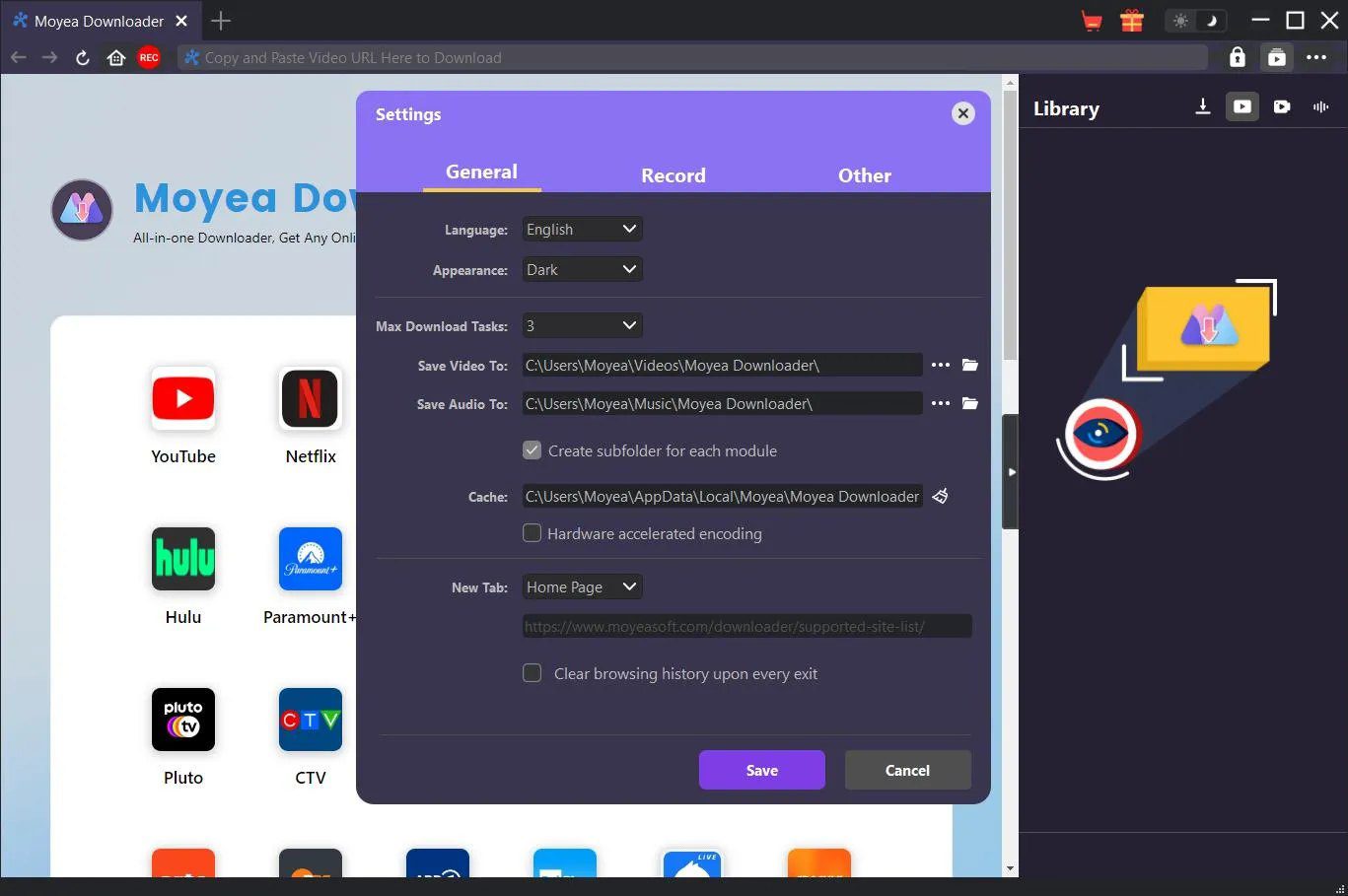
Step 2: Log in and Search for Videos. Use the built-in browser and log in to your Hulu account. Step 3: Parse the video link. Now play the video you want to download, and click the download icon at the bottom right corner of the playback screen to let Moyea parse the link.
Step 3: Download the Video. Now choose video resolution, format (MP4/MKV), audio tracks, and subtitles. After that, click the Download button to start saving the video.
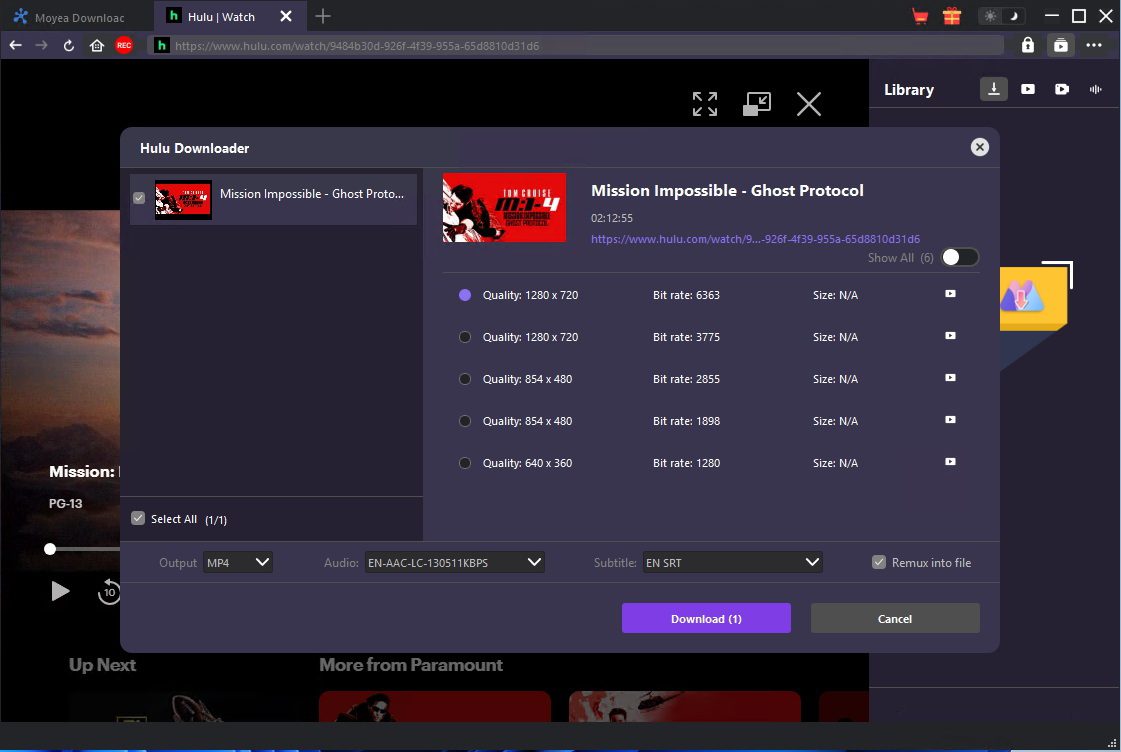
Step 4: Check the Downloading Process. Once you have started downloading, you will have a list of all your download tasks on the right sidebar. Here, you can pause or resume as well.
FAQs
Q. How many profiles can you create on one Hulu account?
Hulu supports up to 7 profiles on an account: the main profile and 6 additional ones. Every profile has a watchlist and tailored content, though they all have the two-stream cap. You can create profiles on the web or on the mobile app.
Q. How many devices can be registered per account?
You can log into Hulu on as many devices as you have, such as phones, tablets, or TVs. There are only two streams that can be played simultaneously, except when you have the Unlimited Screens add-on. On downloads, Hulu allows you to store data on up to 5 mobile devices. Therefore, although you are free to add numerous devices, there are limits when it comes to streaming and downloads.
Q. Can I share my Hulu with family in different houses?
Hulu is officially meant to be used by one household. Although you can sign in at various locations, the two-stream restriction is the same at all locations, and over time, Hulu can restrict account sharing outside the home.
Conclusion
The default package offered by Hulu is simple. You can enjoy two streams at once. This is best for families or shared households. In case more people require access, there are several options available. We have already discussed all this above. Moyea Hulu Downloader is the ideal tool for offline watching. Everything that you save will be on your device, and you can stream it without restriction.
-
Twitch VOD: What It Is and How It WorksSunny Wen/2026-04-24
-
Full Review of Savethevideo: Is Savethevideo Safe?Patrick Murray/2026-04-21
-
Fix Guide: Prime Video Download Not WorkingPatrick Murray/2026-04-21
-
Is Crunchyroll Free? How to Watch Anime Without PayingSunny Wen/2026-04-20
-
StreamFab Netflix Downloader Review: Features, Pros & ConsCassie J./2026-03-31
-
5 Hulu Family Sharing Tips for Smooth ViewingCassie J./2026-03-30
-
Netflix Not Working on Roku? Solve It NowCassie J./2026-03-27
-
3 Proven Ways to Watch Netflix Without AdsCassie J./2026-03-25
-
Apowersoft Streaming Video Recorder Review: Features, Pricing, and AlternativesSunny Wen/2026-03-24
-
Best Amazon Prime Video Recorders: Record with the BestPatrick Murray/2026-03-19









-
Top 5 Udemy Downloaders to Download Udemy Courses on PCPatrick Murray/2025-07-03
-
Best 9 Anime Download Sites to Download Anime [Free & Paid]Patrick Murray/2024-07-12
-
4 Best DRM MPD Downloaders in 2026Leia Liu/2025-05-29
-
HBO Max with Ads VS. No Ads: What Are the DifferencesLumi/2025-05-13
-
6 Best M3U8 Downloaders to Download M3U8 PlaylistsLumi/2025-05-22
-
[2024] How to Download DRM-Protected M3U8 VideosLumi/2024-10-29
-
How to Stream Prime Video on Nintendo Switch?Patrick Murray/2024-09-14
-
How to Activate Tubi on Different Devices? [LG, FireStick, Roku, PS5…]Cassie J./2024-09-24
-
[2026 Latest Review] Best Amazon Prime Video DownloadersPatrick Murray/2025-05-16
-
How to Download an MPD Video with DRMLeia Liu/2024-09-20


















 English
 日本語
日本語