Last updated on 2026-03-11, by
How to Mute or Unmute Someone on Instagram
Summary:
This article teaches you how to mute others on your Instagram profile, news feed, and stories, and details the specific steps to unmute them on your profile and settings page.
Outline
When using Instagram, we always have various needs. When people come across Instagram content they like, many of them have the idea of saving the Instagram video. Even more specifically, many people use professional Instagram video downloaders to preserve memorable clips. Additionally, if we encounter content we don’t want to see but don’t want to completely cut off contact with an account, the mute function can help us hide its content without harming our relationship. As a long-time Instagram user, I’ll now share with you the practical steps for mute and unmute accounts to help you better manage your social media space.
How to Mute Someone on Instagram
Regarding how do you someone on Instagram, the method depends on the situation. Below are three commonly used methods I’ve compiled; you can choose the one that best suits your needs. Note: Mute is different from blocking. It won’t remove the follow relationship or cut off the interaction channel, and the other person won’t notice anything.
How to Mute Someone from Their Profile
If you want to explicitly mute someone’s Instagram account, you can do so directly on their profile page. Of course, this assumes you remember their username. Here are the specific steps to mute someone form Instagram profile:
Step 1: Open Instagram. Enter the other person’s username in the search bar at the top, find it, and click to enter their profile page;
Step 2: Under the name and bio on the other person’s profile page, click the "Following" button;
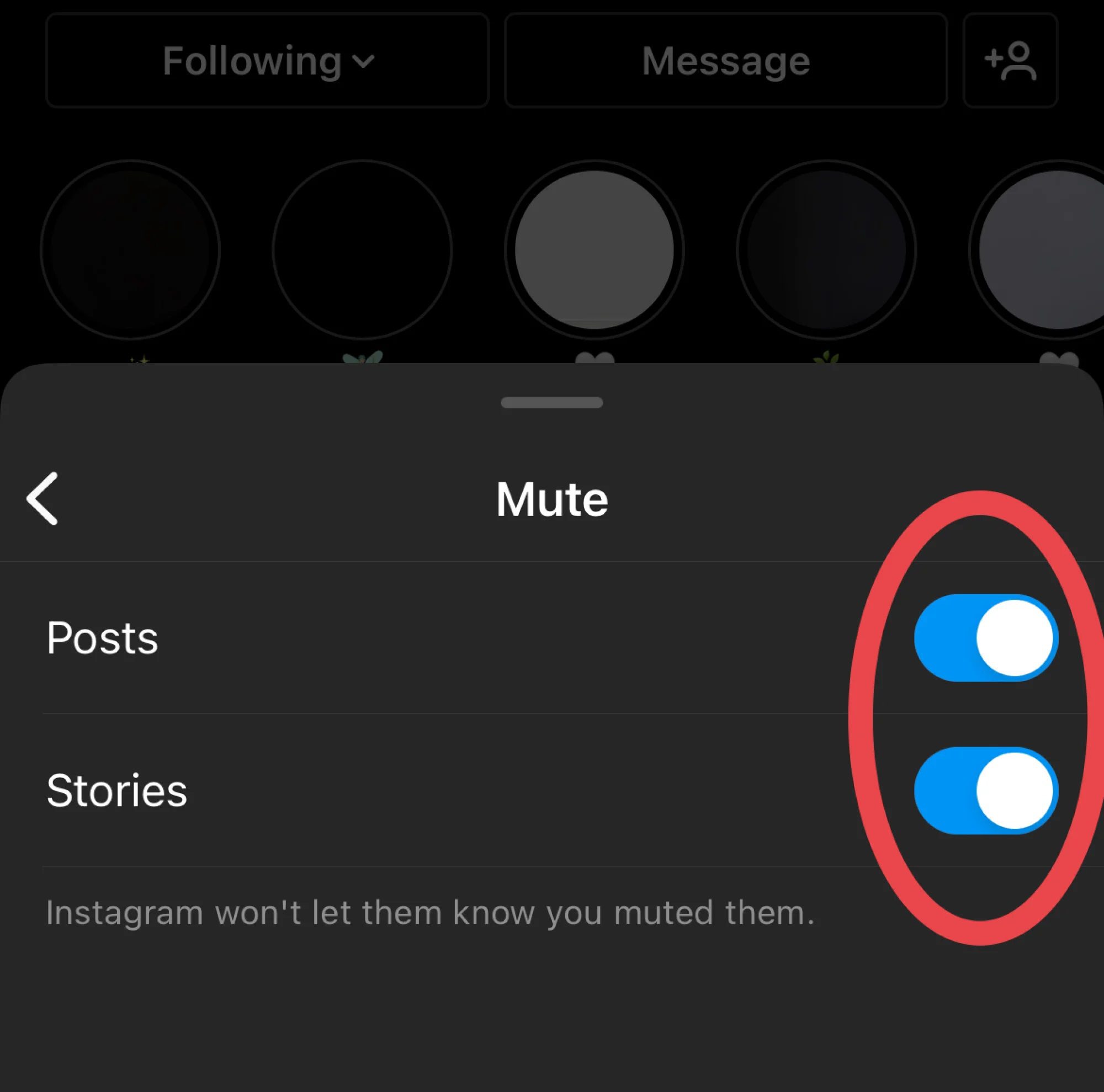
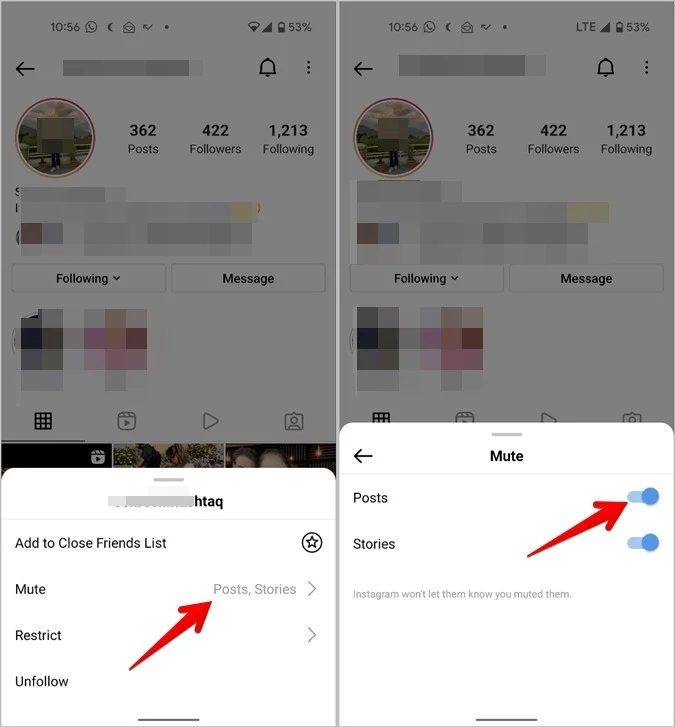
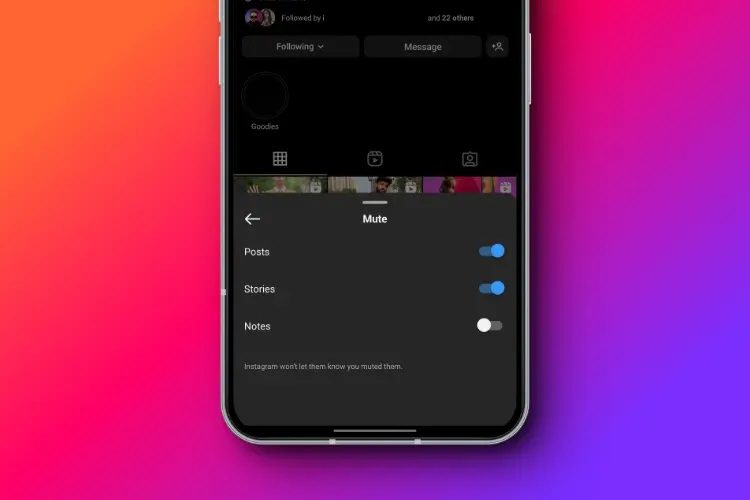
Step 3: In the pop-up list of options, click the "Mute" option;
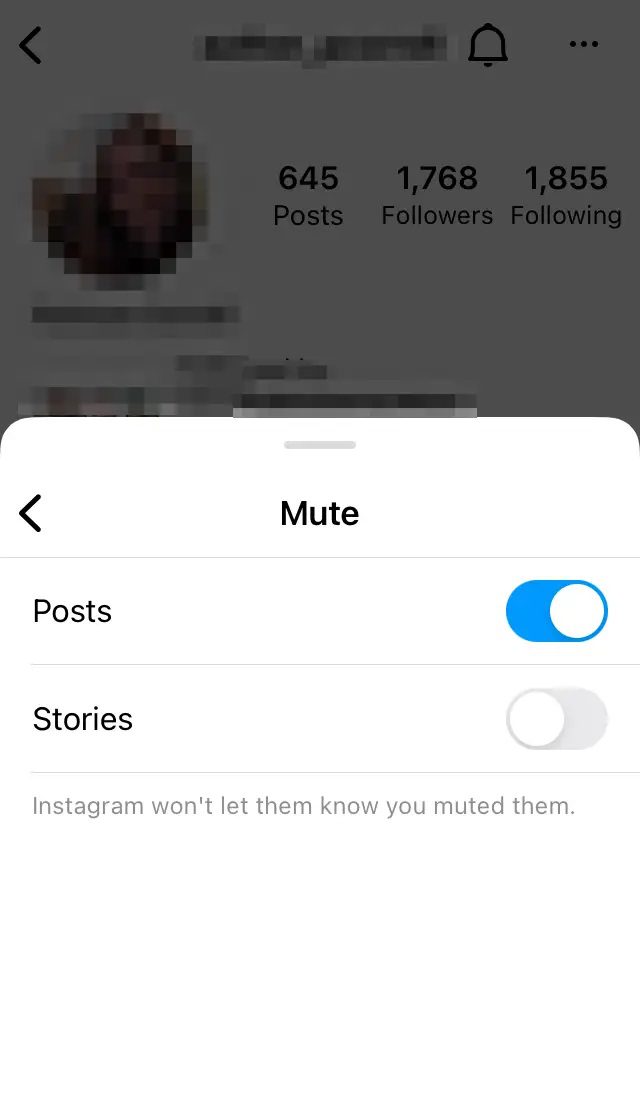
Step 4: Follow the system prompts to choose to mute "Posts," "Stories," or both. Confirm to complete the mute operation for that account.
How to Mute Posts from the Feed
When scrolling through your Instagram feed, if you suddenly come across content you don’t want to see and want to mute the poster, you don’t need to search for the account. You can quickly mute it directly on the current page. These operations are efficient and convenient, and the steps are as follows:
Step 1: On your Instagram feed, find the post from the account you want to mute;
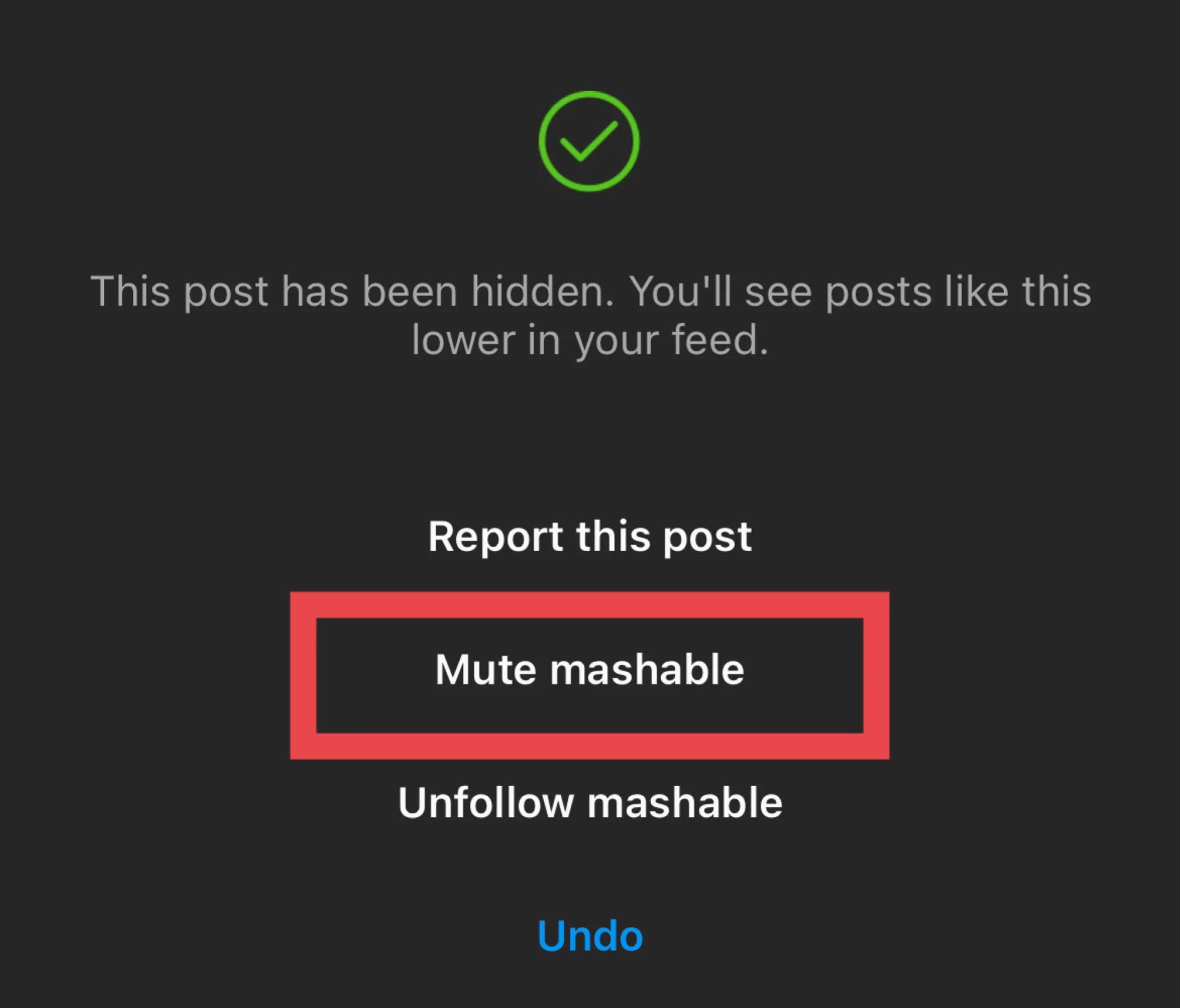
Step 2: Click the three-dot icon in the upper right corner of the post to bring up the options. Click "Hide" in the options;
Step 3: Select "Mute". You can choose to mute only the post or both the post and the story. After confirming, you will no longer see content from that account in your feed.
How to Mute Instagram Stories
Of course, if you simply don’t want to see someone’s Instagram Story, you can choose to mute it. The steps to mute someone’s Instagram Story are very simple, and here are the detailed instructions:
Step 1: In the Story bar at the top of your Instagram homepage, find the profile picture of the account you want to mute;
Step 2: Long-press the profile picture to bring up the Story options menu;
Step 3: In the menu, click the "Mute" option. You can choose "Mute story" or "Mute posts and story";
Step 4: After confirming the action, that account’s Story will be hidden from your Story bar, and you will no longer see their Story or post content.
How to Unmute Someone on Instagram
Sometimes you might accidentally mute a friend. Or, after a while, you might want to view a particular account’s content again. Unmute someone simply by doing so. Regarding how do you unmute someone on Instagram, here are two main ways. After unmute someone, you will resume receiving posts and stories from that account normally, and it will not affect your follow relationship or interaction history.
Unmute from Profile
If you remember the user’s username, you can directly go to his profile page to unmute him. This is the most time-efficient method. The specific steps are as follows:
Step 1: Open Instagram, enter the muted username in the search bar, and go to his profile page;
Step 2: Under the name and bio on his profile page, click the "Following" button;
Step 3: In the pop-up list, click the "Unmute" option;
Step 4: Follow the system prompts to confirm the operation, and you will be able to unmute the account and view its content again.
Unmute from Settings
If you forget the other person’s username, or want to view all muted accounts at once and unmute them, you can unmute them in your personal settings. Here are the steps:
Step 1: Tap your profile picture in the bottom right corner of your Instagram homepage to enter your profile page;
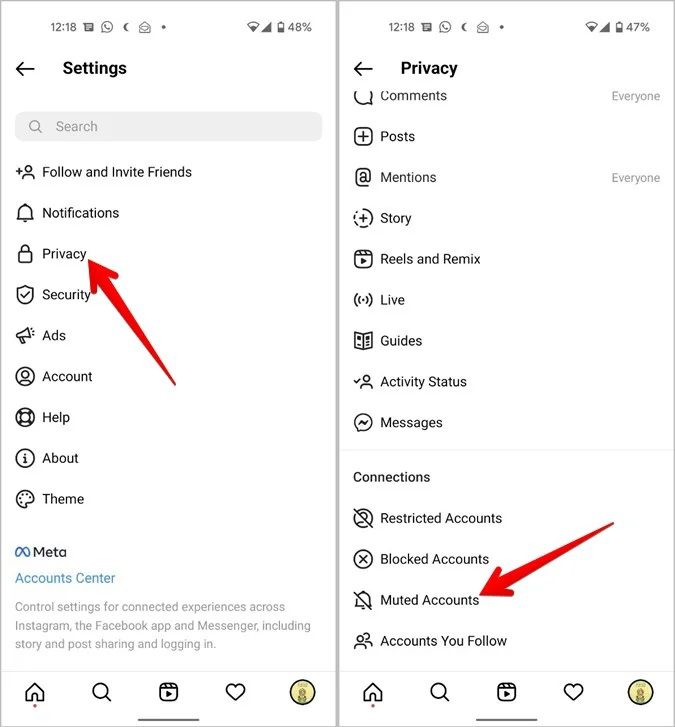
Step 2: Tap the three horizontal lines in the top right corner of your profile page to bring up the sidebar. Tap "Privacy" in the sidebar;
Step 3: In the settings page, find and tap "Muted accounts". In the list of muted accounts, find the account you want to unmute;
Step 4: Tap "Unmute" to the right of the account, and follow the system prompts to confirm and complete the unmute process.
What Happens When You Mute Someone?
Many people are curious about how muting Instagram will affect their own and the other person’s user experience when they use the app for the first time. Based on my long-term experience of using Instagram, I’ve summarized the following key changes to help you clearly understand the specific effects of muting someone on Instagram:
1. The muted account’s posts and Stories will be hidden from your Feed and Stories feed. You will no longer receive notifications from that account, but the follow relationship will not be broken.
2. Both parties can still interact normally. The other person can send me private messages, comment, like, and retweet your content, and you can reply normally. All interaction channels remain open.
3. You will not see the account’s content in any section of your Feed, Stories feed, or Featured page, nor will you receive notifications of their updates. However, you can actively search for their account to view their content.
4. Instagram will not send an official notification to the other person that they have been muted. The other person will not know they have been muted and can still view your content and interact with you normally. It will not affect your social relationship at all.
5. Muting will not change the follow status between the two parties. After unmuting, you can immediately resume viewing the other person’s posts and Stories without needing to renegotiate.
FAQs
Based on my experience using Instagram’s mute function and questions frequently asked by friends, I’ve compiled the following frequently asked questions and provided answers:
1. Will the other person immediately notice that I’ve muted them?
No. Instagram will not send them any notification. Their experience will remain unchanged; they can still view your content and interact with you normally, unaware that they’ve been muted.
2. Will I still be able to see the other person’s content after muting them?
The other person’s content will not appear in your feed or Stories, but if you actively search for their account, you can still view all their public content.
3. If I accidentally mute someone and then unmute them, will previous interactions be lost?
No. After muting or unmuting someone, all past interactions, including likes, comments, and private messages, will be fully preserved. You will be able to see their latest updates immediately without needing to ren-follow them.
4. Can I mute multiple Instagram accounts at once?
Currently, Instagram does not support mass muting of multiple accounts. You can only mute others individually through their homepage, feed, and Stories.
5. What is the core difference between mute and block?
Mute only hides the other person’s posts and Stories, without unfollowing them. Both parties can interact normally, and the other person is unaware of it. It’s a gentle way to "take a break from social interaction." Blocking, on the other hand, completely cuts off all interaction, unfollows the other person, and they cannot see your content or contact you. It’s a more thorough way to isolate yourself from others.
Conclusion
Instagram’s mute function is incredibly user-friendly, offering a fantastic way to manage your personal social space without harming social relationships. Learning how to mute and unmute someone allows for greater control over your Instagram experience, filtering out unnecessary content. Furthermore, it helps preserve valuable social connections, ensuring the social media app truly serves your needs.
-

Twitch VOD: What It Is and How It WorksSunny Wen/2026-04-24
-
Full Review of Savethevideo: Is Savethevideo Safe?Patrick Murray/2026-04-21
-
Fix Guide: Prime Video Download Not WorkingPatrick Murray/2026-04-21
-
Is Crunchyroll Free? How to Watch Anime Without PayingSunny Wen/2026-04-20
-
StreamFab Netflix Downloader Review: Features, Pros & ConsCassie J./2026-03-31
-
5 Hulu Family Sharing Tips for Smooth ViewingCassie J./2026-03-30
-
Netflix Not Working on Roku? Solve It NowCassie J./2026-03-27
-
3 Proven Ways to Watch Netflix Without AdsCassie J./2026-03-25
-
Apowersoft Streaming Video Recorder Review: Features, Pricing, and AlternativesSunny Wen/2026-03-24
-
Best Amazon Prime Video Recorders: Record with the BestPatrick Murray/2026-03-19









-
Top 5 Udemy Downloaders to Download Udemy Courses on PCPatrick Murray/2025-07-03
-
Best 9 Anime Download Sites to Download Anime [Free & Paid]Patrick Murray/2024-07-12
-
4 Best DRM MPD Downloaders in 2026Leia Liu/2025-05-29
-
HBO Max with Ads VS. No Ads: What Are the DifferencesLumi/2025-05-13
-
6 Best M3U8 Downloaders to Download M3U8 PlaylistsLumi/2025-05-22
-
[2024] How to Download DRM-Protected M3U8 VideosLumi/2024-10-29
-
How to Stream Prime Video on Nintendo Switch?Patrick Murray/2024-09-14
-
How to Activate Tubi on Different Devices? [LG, FireStick, Roku, PS5…]Cassie J./2024-09-24
-
[2026 Latest Review] Best Amazon Prime Video DownloadersPatrick Murray/2025-05-16
-
How to Download an MPD Video with DRMLeia Liu/2024-09-20










Related

Twitch VOD: What It Is and How It Works

Full Review of Savethevideo: Is Savethevideo Safe?

Is Crunchyroll Free? How to Watch Anime Without Paying

YouTube TV DVR: How It Works and How to Record Live TV

Download PBS Videos Easily: From Public Clips to Passport Shows

How to Update Instagram App to Get the Latest Features


 English
 日本語
日本語