Last updated on 2025-12-17, by
Hulu Password Guide: Reset, Change & Fix Errors
What This Guide Covers
- No matter you are logged in or blocked by Hulu, you could refer to this post to change Hulu password or reset Hulu password with detailed steps, on either your mobile devices or computer.
There are occasions when you see Hulu error messages like “Your login has been blocked” or “Your login is invalid. Please try again.” That’s when you need to reset Hulu password or change Hulu password. This happens for various reasons, such as wrong Hulu account login credentials, Hulu subscription issue, Hulu server error, etc. In such case, you may need to reset Hulu password. Actually, a frequent update of your Hulu password is a useful method to keep your Hulu account safe. In this post will help you know how to reset Hulu password if you are blocked out, and how to change Hulu password to secure your Hulu account.
Quick AccessCLOSE
How to Change Your Hulu Password If You Still Have Access?
Sometimes you might get Hulu notifications of potential password exposure and be required to change your Hulu password when you still have access. For example, your Hulu password might be too simple, or you haven’t updated your Hulu password for a long time. In such case, you could change Hulu password on Hulu website and Hulu app freely.
1. From Hulu Website
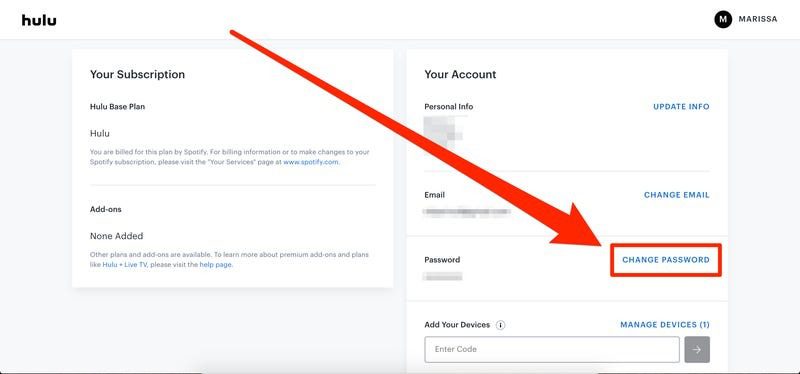
Hulu recommend you change Hulu password on browser directly if you still get the correct password. You could follow the below steps to learn how to change Hulu password on Hulu website:
Step 1. Open a web browser and go to the Hulu.com/account.
Step 2. Log in with your Hulu username and current password.
Step 3. Click on your profile and then choose “Account” option.
Step 4. Scroll down to the “Privacy & Settings” or “Your Account” option.
Step 5. Find the “Password” option.
Step 6. Click the “Change Password” or “Change” button next to the “Password” section.
Step 7. Verify your account if required.
Step 8. Enter your current Hulu password and new password in corresponding fields.
Step 9. Confirm your changes and save them.
2. Inside the Hulu Mobile App
If you are using a Hulu app, you could also change Hulu password on Hulu app by making use of the “Forgot password” setting. In this way, Hulu will send your email a password resetting link, which then could let you change Hulu password. Follow the below guide to learn how to reset Hulu password on Hulu app:
Step 1. Open the Hulu app on your mobile device.
Step 2. Go to the Hulu login section.
Step 3. Click the “Forgot password” option on the login interface.
Step 4. Enter your associated email and then click “Send me a reset link” option.
Step 5. Open your email and then click the Hulu password reset link to set new Hulu password.
Step 6. Confirm the Hulu password reset and save the new password.
In this way, no matter you have forgotten Hulu password or not, you will be able to reset Hulu password in simple clicks.
How to Reset Your Hulu Password?
If you forgot Hulu password, you could reset Hulu password on Hulu app by following above steps, or reset Hulu password on Hulu website as well, as listed below:
Step 1. On your browser, open the Hulu login page.
Step 2. Click the “Forgot your password?” option.
Step 3. Enter your email address and click to get Hulu password reset link.
Step 4. Open your email and click the Hulu password reset link to open the Hulu password creating page.
Step 5. Follow the on-page instructions to create a new Hulu password and save it.
Step 6. Log in your Hulu with the new Hulu password.
That’s how to reset Hulu password on your browser. But sometimes you might forget the Hulu email. Can you change Hulu password without knowing your email? Of course. You need to firstly restore your email, by following the below steps:
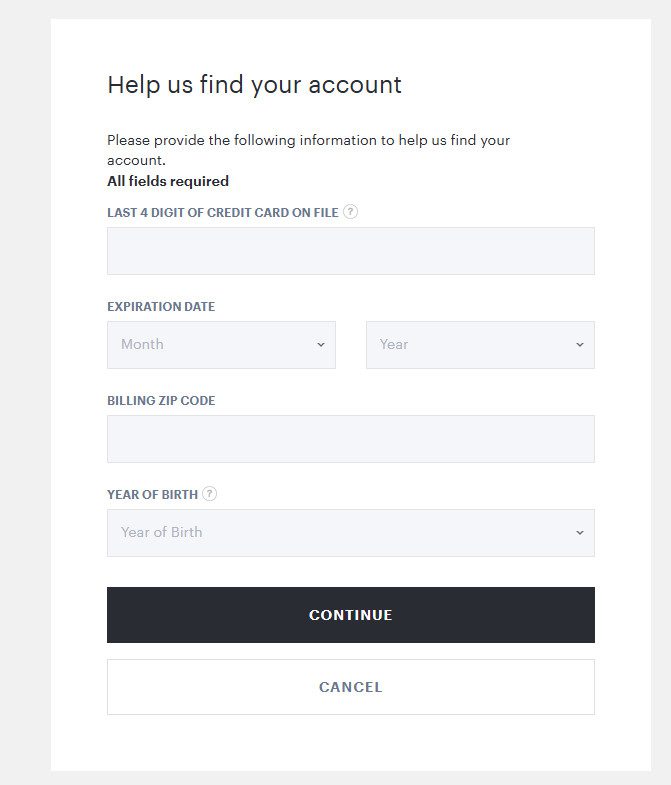
Step 1. Open the Hulu account recovery page at auth.hulu.com/account recovery.
Step 2. Verify that you are a human, if needed. And then click the “Continue” button.
Step 3. Fill in the Hulu account recovery requirements (last 4 digits of your credit/debit card, card’s expiration date, billing ZIP code and your birth year) before clicking the “Continue” button.
Step 4. If all details match, Hulu will reveal the email address associated with your account to you.
Once you get your email address back, you will be able to reset or change Hulu password, through the above-mentioned steps.
Hulu Password Not Working? Common Fixes
There are times when you are sure your Hulu password is correct but it is actually not working. How does Hulu password not work happen? How to fix Hulu password not working issue? You might try the below fixes to handle Hulu password not working issue.
1. Typo or Wrong Password
Check whether you have entered the right Hulu password for Hulu login. Sometimes you might type Hulu password with caps lock, incorrect symbols, or even autofill errors for online password manager. Clear your browser cache, cookies and history to clean the wrong autofills.
2. Account & Access Issues
Sometimes you fail to log into Hulu account due to the account and access issues, including: email mismatching, subscription lapse, too many login attempts, proxy errors (you might log into Hulu in unsupported areas or countries), etc.
3. Technical & Service Problems
Of source, it also might not be your side of Hulu login failure, since sometimes it is the Hulu server side or the technical issues. You might use an outdated Hulu app or device. In such case, check and update your Hulu app and device OS. Also, the Hulu server outage may also result in Hulu login failure.
FAQs
1. How to watch Hulu without login issues while travelling?
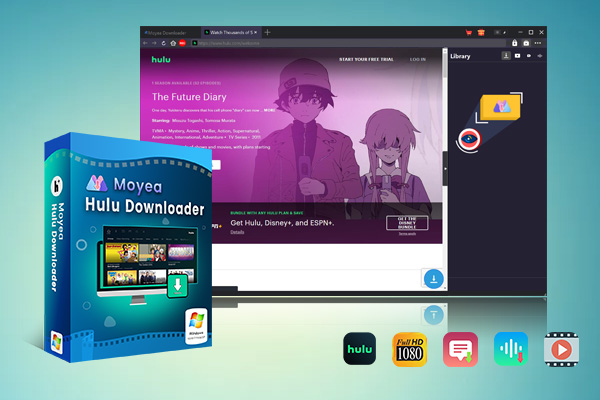
You could try to download Hulu titles before travelling via the internal download feature on Hulu app or 3rd-party Hulu video downloader such as Moyea Hulu Downloader, which helps you download Hulu videos to standalone MP4/MKV files for unlimited offline watching.

-
Batch download Hulu movies and full or selected seasons of shows at up to 1080p resolution with your preferred subtitles and audio tracks. Convert Hulu videos to MP4 or MKV file for offline viewing without expiration, and remove ads even from content on Hulu’s ad-supported plan.
2. Why do I not receive Hulu password reset email?
The Hulu password reset email might have been blocked by your email provider’s spam filters. You could check your spam folders and filters. Meanwhile, make sure you have entered the right email address that is linked to your Hulu account.
3. Can I reset Hulu password on my TV?
No, you can only reset your Hulu password on a browser of a computer or mobile devices, or the Hulu app on your mobile devices.
4. Why is the Hulu password reset link not working?
The Hulu password reset link might have been expired. It is only valid for 5 minutes. You could request a new one if needed.
Conclusion
No matter you still remember your Hulu password or not, you could change or reset Hulu password by following the steps mentioned in this post. This should have helped you out and let you log into Hulu account smoothly, unless your Hulu subscription is invalid. If still you are stuck with the Hulu login, contact the Hulu support for official advices.
-
StreamFab Netflix Downloader Review: Features, Pros & ConsCassie J./2026-03-31
-
5 Hulu Family Sharing Tips for Smooth ViewingCassie J./2026-03-30
-
Netflix Not Working on Roku? Solve It NowCassie J./2026-03-27
-
3 Proven Ways to Watch Netflix Without AdsCassie J./2026-03-25
-
Apowersoft Streaming Video Recorder Review: Features, Pricing, and AlternativesSunny Wen/2026-03-24
-
Best Amazon Prime Video Recorders: Record with the BestPatrick Murray/2026-03-19
-
How to Download Amazon Prime Videos to iPhone/iPadPatrick Murray/2026-03-18
-
YouTube TV DVR: How It Works and How to Record Live TVSunny Wen/2026-03-17
-
How to Record Twitch Streams? All Methods ExplainedPatrick Murray/2026-03-17
-
Download PBS Videos Easily: From Public Clips to Passport ShowsPatrick Murray/2026-03-17









-
Top 5 Udemy Downloaders to Download Udemy Courses on PCPatrick Murray/2025-07-03
-
Best 9 Anime Download Sites to Download Anime [Free & Paid]Patrick Murray/2024-07-12
-
4 Best DRM MPD Downloaders in 2026Leia Liu/2025-05-29
-
HBO Max with Ads VS. No Ads: What Are the DifferencesLumi/2025-05-13
-
6 Best M3U8 Downloaders to Download M3U8 PlaylistsLumi/2025-05-22
-
[2024] How to Download DRM-Protected M3U8 VideosLumi/2024-10-29
-
How to Stream Prime Video on Nintendo Switch?Patrick Murray/2024-09-14
-
How to Activate Tubi on Different Devices? [LG, FireStick, Roku, PS5…]Cassie J./2024-09-24
-
[2026 Latest Review] Best Amazon Prime Video DownloadersPatrick Murray/2025-05-16
-
How to Download an MPD Video with DRMLeia Liu/2024-09-20


















 English
 日本語
日本語