Last updated on 2025-12-19, by
How to Watch Hulu Without Ads Easily?
What This Guide Covers
- If you want to watch Hulu without ads, this post will list several solutions on how to get rid of ads on Hulu, including ad free Hulu subscription, Hulu ad blocker, Hulu ad skipper, etc.
While the Hulu ad-supported plans enable you to watch Hulu at lower cost, it will make you suffer from repeated and annoying ads. The frequent ads on Hulu could really ruin your Hulu movie night. Why does Hulu have ads? Hulu delivers ads for 2 main reasons: as a core business model to acquire revenue at lower subscription price, and due to licensing requirements. Some ad-free plans might contain ads because of the licensing issue. Then, can you block ads on Hulu? Do ad blockers work on Hulu? Actually, there are quite a few solutions on how to get rid of ads on Hulu. We will share them in detail in this post.
Quick AccessCLOSE
The Permanent Solution – Downloading Content Ad-Free
The very first solution on how to get rid of ads on Hulu is to make use of Hulu video downloaders to download Hulu contents without ads. It is a permanent solution to help you get Hulu without ads, and works for both ad-free and ad-supported Hulu on-demand contents. However, it should be noted that it is not the Hulu download feature, which actually doesn’t work with Hulu ad-supported subscribers and gets quite a few limitations. It is to make use of 3rd-party Hulu video downloaders. Moyea Hulu Downloader is highly recommended for its excellent performance in downloading Hulu contents for ad-free offline watching.

-
- Download Hulu shows and movies to MP4/MKV videos.
- Support to download Hulu episodes of all/certain seasons in batches.
- Pack subtitles into output video file, or save captions as independent SRT/SUP files.
- user-friendly and muitilingual settings.

The below guide would show you how to download Hulu videos for ad-free offline watching on any MP4/MKV compatible devices and players.
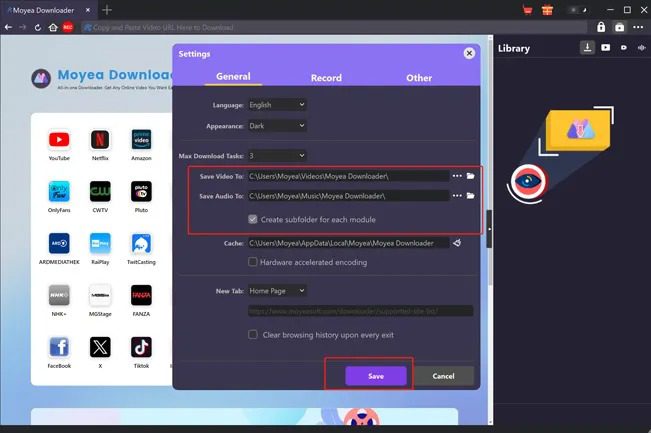
Step 1: Set download directory
Download, install and kick off Moyea Downloader. Then click the “More” button (in 3-dot icon) to choose “Settings” option. On the “Settings > General” tab, set downloading directories.
Step 2: Play back Hulu video
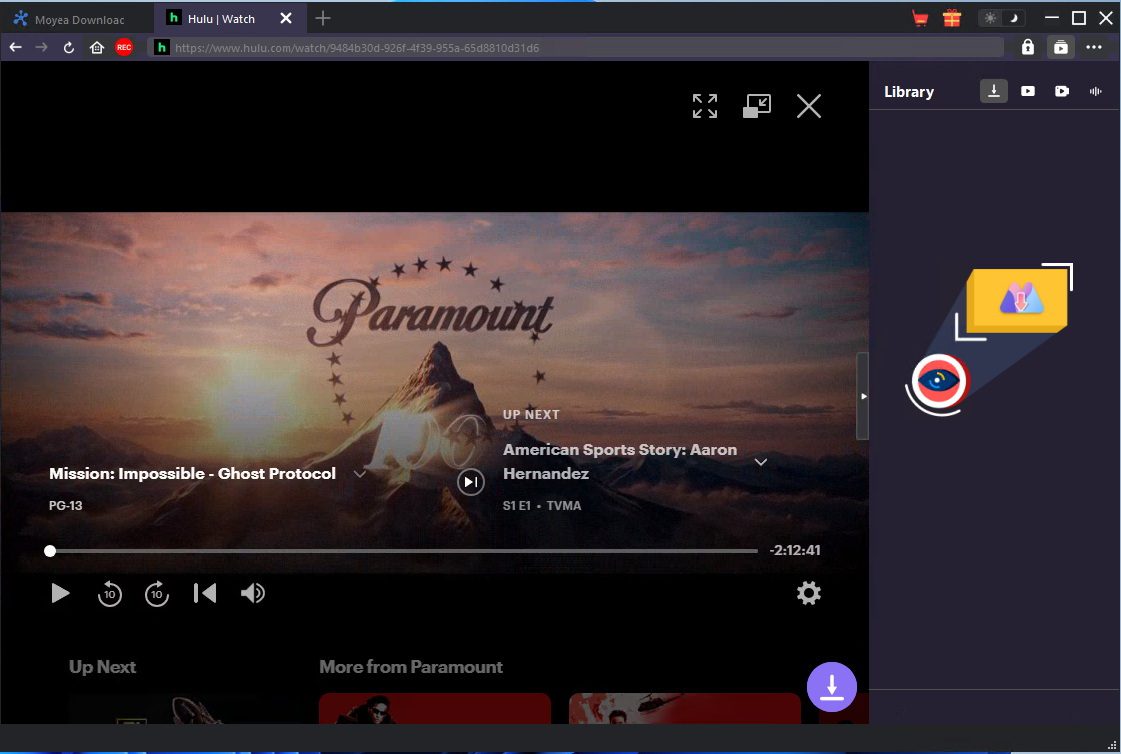
Open Hulu website within Moyea Downloader and log in. Play back target Hulu video and then click the round icon at the bottom right corner to start analyzing target Hulu video. Note: Moyea Hulu Downloader only downloads Hulu on-demand videos.
Step 3: Choose download options
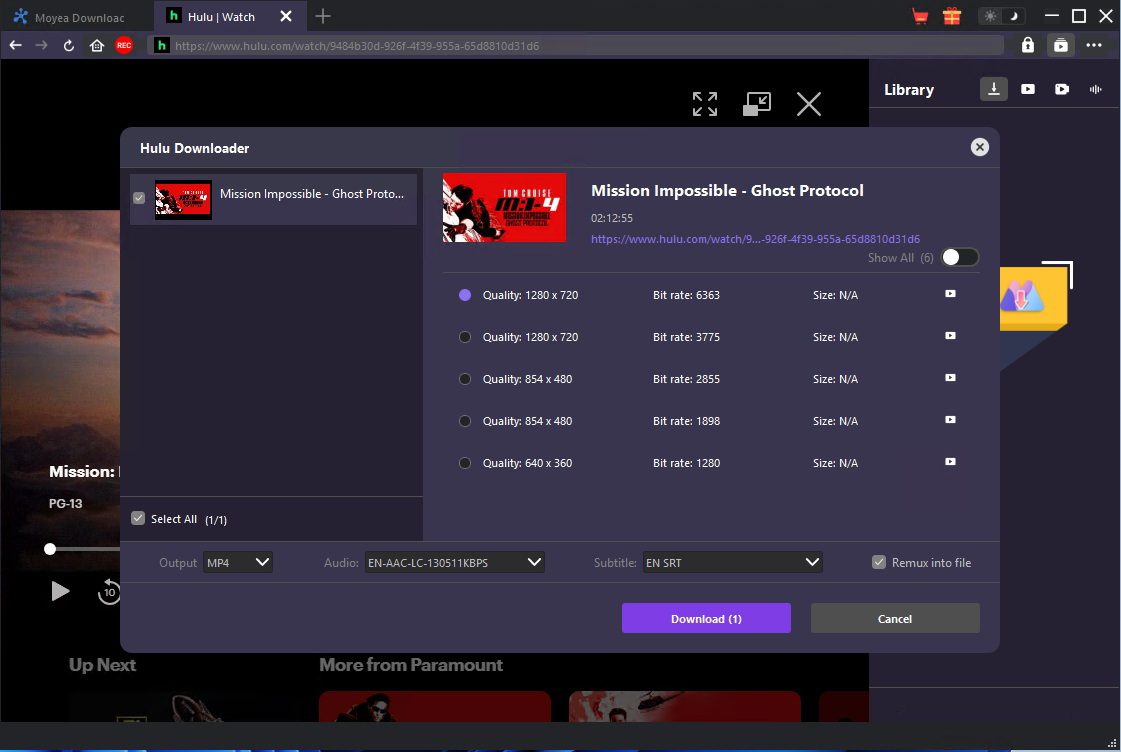
Once the analyzing completes, you will be provided with multiple download options. Choose the download option, output format, audio tracks and subtitles, and then click the “Download” button.
Step 4: Start downloading Hulu videos
After clicking the “Download” button, you then could view the downloading tasks on the right sidebar. Moyea Hulu Downloader will automatically remove ads during the downloading process. Once the Hulu downloads complete, you could get ad-free Hulu videos in either MP4 or MKV format, which could then be played back on various media players and devices without ads.
Technical Workarounds – Using Ad Blockers & Browser Tricks
Also, you could try Hulu ad blockers for how to skip ads on Hulu. Hulu ad blocker could not only improve your Hulu video viewing experience, but also reduce bandwidth consumption. You could use Hulu ad blocker extensions, Hulu ad blocker apps, or directly make use of ad-blocking browsers to block ads on Hulu playback. The below workarounds show you how to skip ads on Hulu with various Hulu ad blockers.
- Hulu ad blocker extensions: Multiple ad blocker extensions could work on Hulu ad blocking, such as uBlock Origin, Ghostery, AdBlock Plus, etc. Just check your browser extension store to see if it contains these Hulu ad blockers.
- Hulu ad-blocking apps: AdGuard (for mobile devices like Android and iOS devices), NordVPN and Surfshark, etc.
- Hulu ad blocking browser: Some browsers like Brave provides native ad-blocker feature to block ads on Hulu and other streaming services.
Besides the above-mentioned 3 methods on how to skip ads on Hulu, you could also try some browser tricks to skip ads on Hulu, as listed below:
- Open 2 Hulu tabs to skip ads on Hulu: Watch one tab while the other tab is streaming ads. You could even fast-forward playback to skip ads in such way.
- Refresh your browser: This sometimes will skip the entire ad, but might not work all the time.
The Official Upgrade – Switching to a No-Ads Plan
Of course, the native and official method on how to get rid of ads on Hulu is without doubt to upgrade to ad-free plans. There are quite a few different ad-free Hulu plans for you to subscribe. You could check all the Hulu ad-free plans on its official website. For your convenience, here we have listed part of Hulu plans in the below table.
| Plans | Services | Prices (per month) |
|---|---|---|
| Hulu | Hulu (With Ads) | $11.99 |
| Hulu Premium | Hulu (No Ads) | $18.99 |
| Disney+, Hulu Bundle | Hulu (With Ads) & Disney+ (With Ads) | $12.99 |
| Disney+, Hulu Bundle Premium | Hulu (No Ads) & Disney+ (No Ads) | $19.99 |
Besides the above standalone and bundle plans, you could also upgrade to the Hulu + Live TV plans to upgrade to Hulu ad-free plans for skipping ads on Hulu, as well as ad-free Hulu addons on some TVs. You could follow the below guide to learn how to upgrade your Hulu subscription plan to ad-free plans directly:
Step 1. Log into your Hulu account on a browser.
Step 2. Open the “Your Subscription” section.
Step 3. Open the “Manage Plan” option and then turn on the target plan you want to upgrade to.
Step 4. Select the “Review Changes” and then click to confirm upgrade.
If you are billing through third parties, the operation might be different from the above ones. Just follow your 3rd-party instructions to upgrade to the Hulu ad-free plans.
Comparison: Which Ad-Removal Method is Best for You?
You have obtained 3 different methods to get rid of Hulu ads for ad-free playback. Which one is best for you? What are their advantages and disadvantages? The below contents will show you what each method suits most.
Comparison
- 3rd-party Hulu video downloaders: This could be considered as the ultimate solution to help you get rid of ads on Hulu. Through downloading, it could detect and remove all ads on Hulu videos, so as to make sure you can watch Hulu videos offline without being disturbed by any ad. It removes ads completely, but you may need to pay extra cash, since most 3rd-party Hulu video downloaders are not free.
- Hulu ad blockers or skippers: You only need to install certain Hulu ad blockers or skippers, or ad-blocking browsers to enjoy Hulu contents online directly without ads. What needs to be mentioned is that these ad blockers or skippers might not work all the time. For example, Hulu might detect these ad blockers and turns black screen. And some of them require you to upgrade to its premium version, which means you need to pay for them.
- Upgrading to Hulu ad-free plans: This should be the most effective and official method. You can directly get no ads just through paying extra cash per month. The extra cash you need to pay varies upon your target Hulu plan (standalone Hulu ad-free plan or bundle plans). Still, one thing you need to remember is that even you upgrade to the Hulu ad-free plans, you might still come across ads in streaming Hulu contents due to licensing issues.
FAQs
1. Why do ads still appear after upgrading to Hulu ad-free plans?
This happens due to licensing issues. Not all Hulu titles are licensed as ad-free for streaming on Hulu. Some Hulu titles are delivering ads as required by the movie studios.
2. Can ad blockers completely remove Hulu ads?
It’s not 100% guaranteed that all ads will be completely removed by Hulu ad blockers. Some Hulu ad blockers might even result in playback errors like black screen.
3. Can I Skip Hulu Ads on a Smart TV?
Most smart TVs don’t support Hulu ad blocking. You could try to upgrade to Hulu ad-free plans first, or download Hulu titles to standalone video files for ad-free offline watching.
4. Can I get rid of ads on Hulu for free?
Yes, you could try some free Hulu ad blockers to block Hulu ads for free, or Hulu video recording tools like CleverGet Recorder to record Hulu contents for free for ad-free offline watching.
Conclusion
Through the above contents in this post, you should have learned how to get rid of ads on Hulu in different ways. A Hulu ad-free plan should help you bypass most ads, but not all, due to the licensing issue. And Hulu ad blockers or skippers might let you block Hulu ads for free, but not work all the time. 3rd-party Hulu video downloader ensures you 100% remove Hulu ads for ad-free Hulu video watching offline. Choose the one that meets your needs most.
-
StreamFab Netflix Downloader Review: Features, Pros & ConsCassie J./2026-03-31
-
5 Hulu Family Sharing Tips for Smooth ViewingCassie J./2026-03-30
-
Netflix Not Working on Roku? Solve It NowCassie J./2026-03-27
-
3 Proven Ways to Watch Netflix Without AdsCassie J./2026-03-25
-
Apowersoft Streaming Video Recorder Review: Features, Pricing, and AlternativesSunny Wen/2026-03-24
-
Best Amazon Prime Video Recorders: Record with the BestPatrick Murray/2026-03-19
-
How to Download Amazon Prime Videos to iPhone/iPadPatrick Murray/2026-03-18
-
YouTube TV DVR: How It Works and How to Record Live TVSunny Wen/2026-03-17
-
How to Record Twitch Streams? All Methods ExplainedPatrick Murray/2026-03-17
-
Download PBS Videos Easily: From Public Clips to Passport ShowsPatrick Murray/2026-03-17









-
Top 5 Udemy Downloaders to Download Udemy Courses on PCPatrick Murray/2025-07-03
-
Best 9 Anime Download Sites to Download Anime [Free & Paid]Patrick Murray/2024-07-12
-
4 Best DRM MPD Downloaders in 2026Leia Liu/2025-05-29
-
HBO Max with Ads VS. No Ads: What Are the DifferencesLumi/2025-05-13
-
6 Best M3U8 Downloaders to Download M3U8 PlaylistsLumi/2025-05-22
-
[2024] How to Download DRM-Protected M3U8 VideosLumi/2024-10-29
-
How to Stream Prime Video on Nintendo Switch?Patrick Murray/2024-09-14
-
How to Activate Tubi on Different Devices? [LG, FireStick, Roku, PS5…]Cassie J./2024-09-24
-
[2026 Latest Review] Best Amazon Prime Video DownloadersPatrick Murray/2025-05-16
-
How to Download an MPD Video with DRMLeia Liu/2024-09-20










Related








 English
 日本語
日本語