Last updated on 2026-02-25, by
Where Are Prime Video Downloads Stored on PC/Mobile?
Summary:
Where are Prime Video downloads stored? This guide uncovers the exact location on different devices and bonus tips to save videos anywhere.
If you’ve downloaded a movie or TV show on Prime Video for offline viewing and then struggled to find it later, you are not alone. So, where are Prime Video downloads stored? If you have the same question, we are here to clear up your confusion! This guide will show you how to find downloaded movies on Amazon Prime across different devices. Just read on to learn more!
OutlineCLOSE
1. How Prime Video Downloads Work
Where does Amazon Prime store downloaded movies? The thing is, when we tap the download button, the app doesn’t save a simple video file. Instead, it downloads encrypted video segments, audio tracks, subtitles, and metadata that only the app can read. Based on our testing, we have found that it works as follows:
- Tie to Device: Our downloads stay tied to the specific device and the Amazon account we use. If we switch devices, we must download them again.
- Subscription-dependent: As long as our Prime subscription is active, downloads are accessible. But for rentals, they usually expire after a playback window (around 48 hours) once we start watching.
- Storage format: The files are not standard MP4 videos. We can find fragmented and encrypted files instead of playable media.
- Download limits: Based on our experience, we can download roughly 25-30 titles for one device. This might vary depending on region and content licensing.
- Path to access: Where are my Prime Video downloads? We can always watch them through My Stuff > Downloads inside the app.
2. Where Are Prime Video Downloads Stored on Different Devices?
Since Amazon Prime Video is available on various devices, the stored locations might be different. In this section, we will walk through how we locate Prime Video downloads on each device.
2.1. Prime Video Downloads on Windows 10/11
When we use the Prime Video app from the Microsoft Store, the downloads are stored inside a protected UWP app folder. This is the exact Prime Video download location we found:
C:\Users\[YourUsername]\AppData\Local\Packages\AmazonVideo.PrimeVideo_pwbj9vvecjh7j\LocalState\Downloads
For Windows 10, you can follow the steps below:
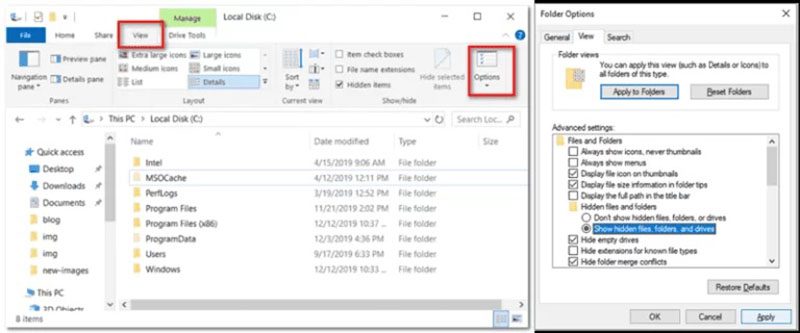
- Step 1. We open File Explorer, click the View tab, and choose Options.
- Step 2. We switch to the View section, enable Show hidden files, folders, and drives, then click Apply and OK.
- Step 3. Then paste the file path (replace “Users” with our username) into the address bar to access the hidden download folder.
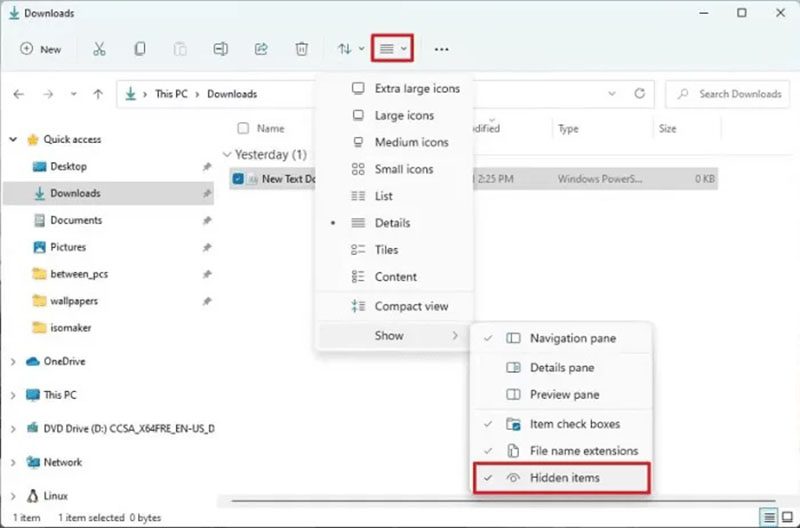
Yet, it can be slightly different for Windows 11. Here are the steps:
- Step 1. We launch File Explorer, click View, then go to Show and enable Hidden items.
- Step 2. Then we paste the same file path (again, replace the “Users” with our actual username) in the address bar to see the hidden files.
2.2. Prime Video Downloads on Android Phones & Fire Tablets
On Android devices and Fire Tablets, we noticed that downloads are stored in the app’s private data directory. Here’s the exact Prime Video download location:
/Android/data/com.amazon.avod.thirdpartyclient/files/, or maybe: /data/data/com.amazon.avod.thirdpartyclient/
However, based on our testing, we can not access via the path just like with a PC. Instead, we have to go with this way: tap the Downloads icon at the bottom to view and manage all my downloaded videos in one place.
Alternatively, we can switch the Prime Video download to SD cards. You can set it up with this: Open Prime Video > My Stuff > Settings > Stream & Download > Download videos to SD card.
Note: Based on our testing, this change only applies to future downloads, not the ones we already saved.
2.3. Prime Video Downloads on macOS & iOS
Where are Prime Video downloads stored when it comes to Apple’s devices? Unfortunately, Prime Video downloads are much harder to access because of strict app sandboxing.
We tried this path on macOS:
~/Library/Containers/com.amazon.aiv.AIVApp/Data/. However, what we can see here are protected app bundles rather than playable video files.
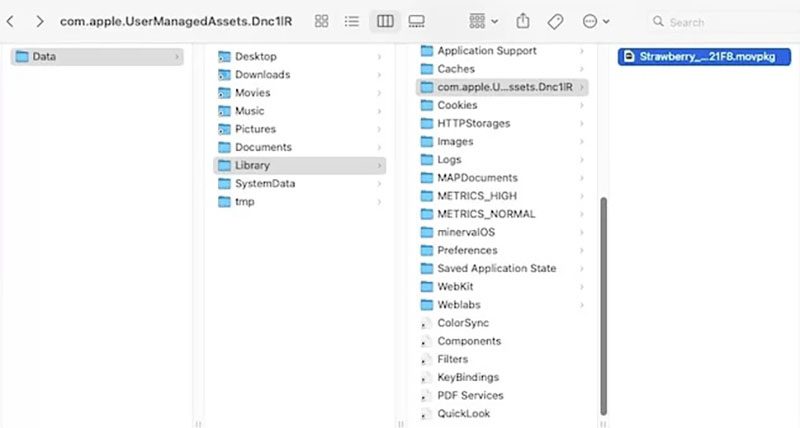
For iOS devices, we can’t directly access the download files at all. The system stores them inside a private app container that isn’t visible in the Files app.
2.4. Bonus tips: Download Prime Video Content to Any Location
From what we’ve experienced, Prime Video’s built-in downloads are fine for quick offline watching, but that’s about it. The files are encrypted, locked inside the app, and tied to one device. There is no way we can share them directly.

-
Batch download Amazon Prime Video movies and full or selected seasons of shows at up to 1080p resolution with preferred subtitles and audio tracks. Download Amazon Prime titles as MP4 or MKV file for offline viewing without expiration, and remove ads for offline ad-free watching.

Everyone wants more freedom and flexibility over the files. So that’s why we use CleverGet Amazon Downloader later. The software allows us to download Prime Video titles as regular MP4 or MKV files instead of those hidden/unreadable files. That means we can save them to any folder, an external hard drive, or even a USB stick. Then we can just watch them on any device without hassle or expiration.
3. FAQs
3.1. Can Prime Video downloads be moved to an SD card?
Yes, but only on Android and Fire Tablets. We can just go to Settings > Stream & Download > Download videos to SD card for settings. But just mind it only applies to new downloads.
3.2 Why can’t I find Prime Video downloads on my device?
From our experience, the most common reasons we can’t find Prime Video downloads are: the folders may be hidden on Windows, the files are locked inside the app on macOS/iOS, the wrong file path, storage permissions on Android may not be enabled, or the app just needs a quick refresh.
3.3 Do Prime Video downloads disappear automatically?
Yes, they can. From what we’ve seen, most downloads don’t stay forever. We usually have about 30 days to start watching a downloaded title, and once we press play, we often get around 48 hours to finish it. They can also become unavailable if our Prime subscription ends or if the title is removed from the Prime Video library.
Conclusion
Where are Prime Video downloads stored? Now you should know the clear path. Prime Video downloads are convenient for quick offline access, but we can not watch and move them freely as they are encrypted. That’s why CleverGet Amazon Downloader truly stands out as a better workaround. It can help us save videos to any folder and watch them anytime, our way!
-
StreamFab Netflix Downloader Review: Features, Pros & ConsCassie J./2026-03-31
-
5 Hulu Family Sharing Tips for Smooth ViewingCassie J./2026-03-30
-
Netflix Not Working on Roku? Solve It NowCassie J./2026-03-27
-
3 Proven Ways to Watch Netflix Without AdsCassie J./2026-03-25
-
Apowersoft Streaming Video Recorder Review: Features, Pricing, and AlternativesSunny Wen/2026-03-24
-
Best Amazon Prime Video Recorders: Record with the BestPatrick Murray/2026-03-19
-
How to Download Amazon Prime Videos to iPhone/iPadPatrick Murray/2026-03-18
-
YouTube TV DVR: How It Works and How to Record Live TVSunny Wen/2026-03-17
-
How to Record Twitch Streams? All Methods ExplainedPatrick Murray/2026-03-17
-
Download PBS Videos Easily: From Public Clips to Passport ShowsPatrick Murray/2026-03-17









-
Top 5 Udemy Downloaders to Download Udemy Courses on PCPatrick Murray/2025-07-03
-
Best 9 Anime Download Sites to Download Anime [Free & Paid]Patrick Murray/2024-07-12
-
4 Best DRM MPD Downloaders in 2026Leia Liu/2025-05-29
-
HBO Max with Ads VS. No Ads: What Are the DifferencesLumi/2025-05-13
-
6 Best M3U8 Downloaders to Download M3U8 PlaylistsLumi/2025-05-22
-
[2024] How to Download DRM-Protected M3U8 VideosLumi/2024-10-29
-
How to Stream Prime Video on Nintendo Switch?Patrick Murray/2024-09-14
-
How to Activate Tubi on Different Devices? [LG, FireStick, Roku, PS5…]Cassie J./2024-09-24
-
[2026 Latest Review] Best Amazon Prime Video DownloadersPatrick Murray/2025-05-16
-
How to Download an MPD Video with DRMLeia Liu/2024-09-20








Related

Best Amazon Prime Video Recorders: Record with the Best
How to Download Amazon Prime Videos to iPhone/iPad

How to Contact Amazon Prime Video Customer Service for Help/Support?
Quick Guide: How Long Do Prime Video Downloads Last?

Easy Guide: How to Burn Amazon Videos to DVDs?
How to Save Amazon Prime Videos as MKV Files?


 English
 日本語
日本語