Last updated on 2026-04-24, by
Twitch VOD: What It Is and How It Works
Summary:
What is Twitch VOD? No matter if you are Twitch streamer or a viewer, In this article, I offer detailed answer and teach you how to download Twitch VODs.
MenuCLOSE
Even if you have never watched a Ninja live stream, you probably heard of his legendary runs in Fortnite. Now, Twitch has grown far more than just game streaming. You can watch a Just Chatting talk show, a live music set, or an IRL (In Real Life) outdoor adventure. But the problem is that audiences cannot watch everything live for hours. This is why Twitch VOD comes in. No matter if you are a live steamer or a viewer on Twitch, if you don’t know what it is, in this article, I will get straight to the point to explain everything about Twitch VOD for you.
Part 1: What Is Twitch VOD?
Developed by Twitch Interactive (a subsidiary of Amazon), Twitch VODe is an integrated recording system that streamers use to save past live streams. The main reason is to solve the fleeting nature of live content that many audiences often cannot watch live in time. For the audience, they have a choice not to miss their favorite content. For a content creator, you get a critical growth tool by building a content library that potential followers can discover, while they still watch your video, even if you do not run a live. Plus, these recordings provide the raw footage needed for creating shorter highlights or exporting content to platforms like YouTube.
Part 2: How to Enable Twitch VOD
By default, Twitch doesn’t save your live video automatically, and if you wish to keep it, you need to manually enable it. Here are the steps to make sure your hard work doesn’t disappear.
Step 1: Go to Twitch and activate your Twitch account.
Step 2: Click your profile picture in the upper right corner.
Step 3: Choose Creator Dashboard from the drop-down menu.
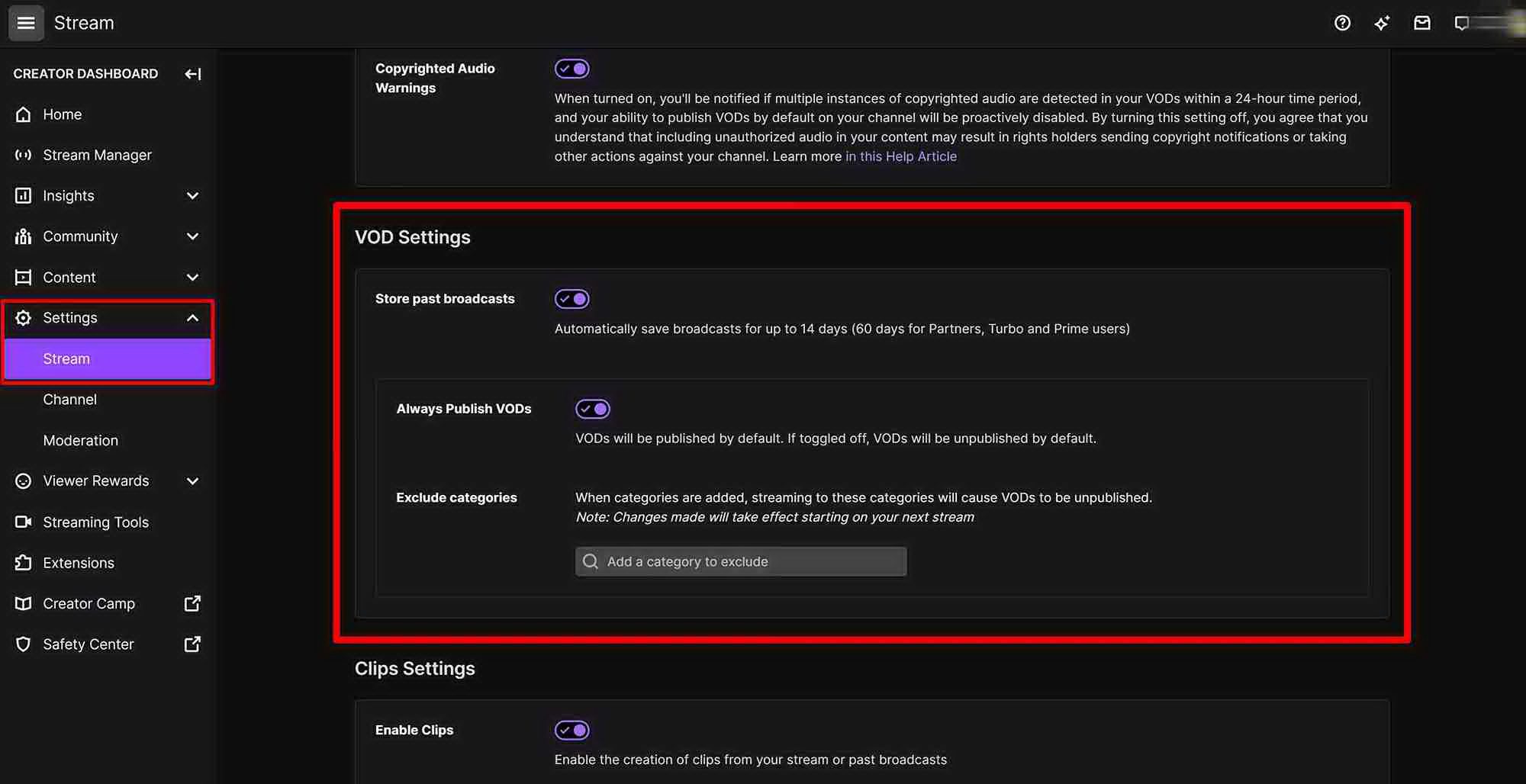
Step 4: Click on the Settings tab on the left sidebar and then select Stream.
Step 5: You can see there is a VOD Settings section.
Step 6: Turn on Store past broadcast so that Twitch VOD can save your live videos automatically.
Part 3: How to Find Twitch VODs
For viewers want to watch someone else’s VODs and streamers who want manage their own VODs, the steps are different. But all should note, Twitch has time limit to store these VODs, after a perid these recordings will be deleted, which I will put the rule in the end of this part.
For Viewers: How to find someone else’s VODs
Step 1: Go to the search bar and search the name of the streamer you want to watch.
Step 2: Go into the streamer profile and choose Videos tab.
Step 3: Find past broadcast section to find recent recorded videos.
For Streamers: How to find and manage your own VODs
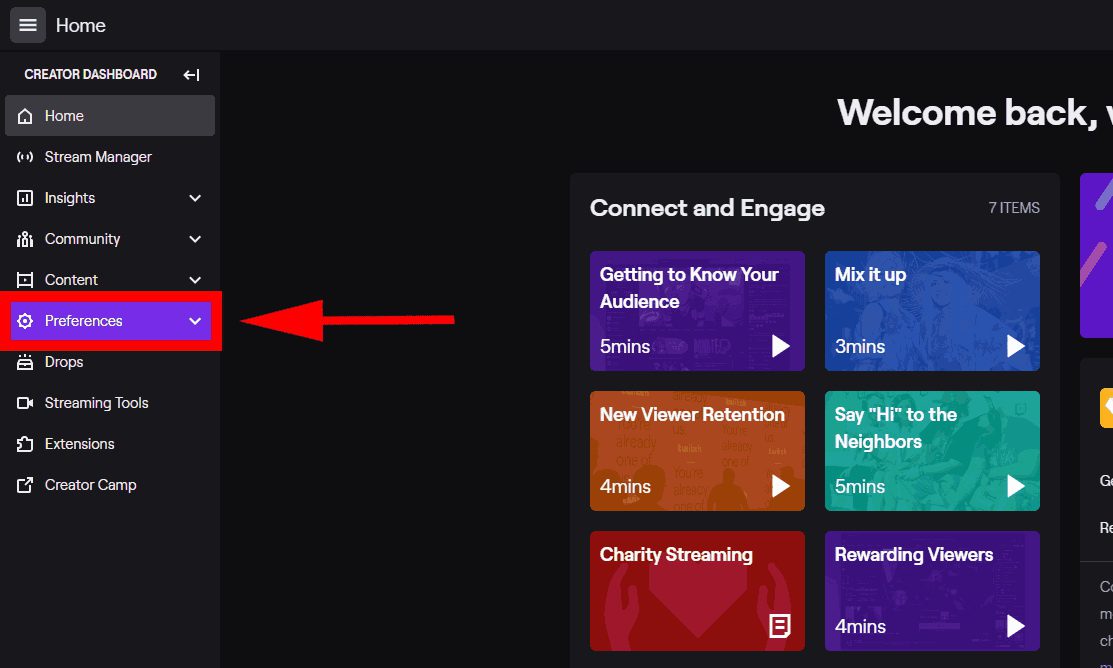
Step 1: Click your profile picture and select Creator Dashboard.
Step 2: In the left panel, choose Content and then select Video Producer.
Step 3: Here you can see all your recorded videos and manage them.
As said in advance, Twitch doesn’t sotre your recordings forever, according to your account type, there are different time limits:
|
|
Storage Duration |
|
Regular Users |
7 Days |
|
Twitch Affiliates |
14 Days |
|
Twitch Partners & Turbo/Prime Users |
60 Days |
Part 4: How to Save Twitch VODs to Your Device
Once a VOD reaches its limit, it is gone for good. Whether you are a streamer or a viewer, here I provide detailed step-by-step instructions to download Twitch VODs to let your save the videos permanently.
1. Use Twitch’s Built-in Highlight/Download Feature
Streamers can use the “Highlight” feature to bypass the expiration date. Highlights are stored on your channel forever, though Twitch now applies a 100-hour total limit for all Highlights and Uploads combined on your channel. Or, you can download the video offline on your computer. Here are the steps.
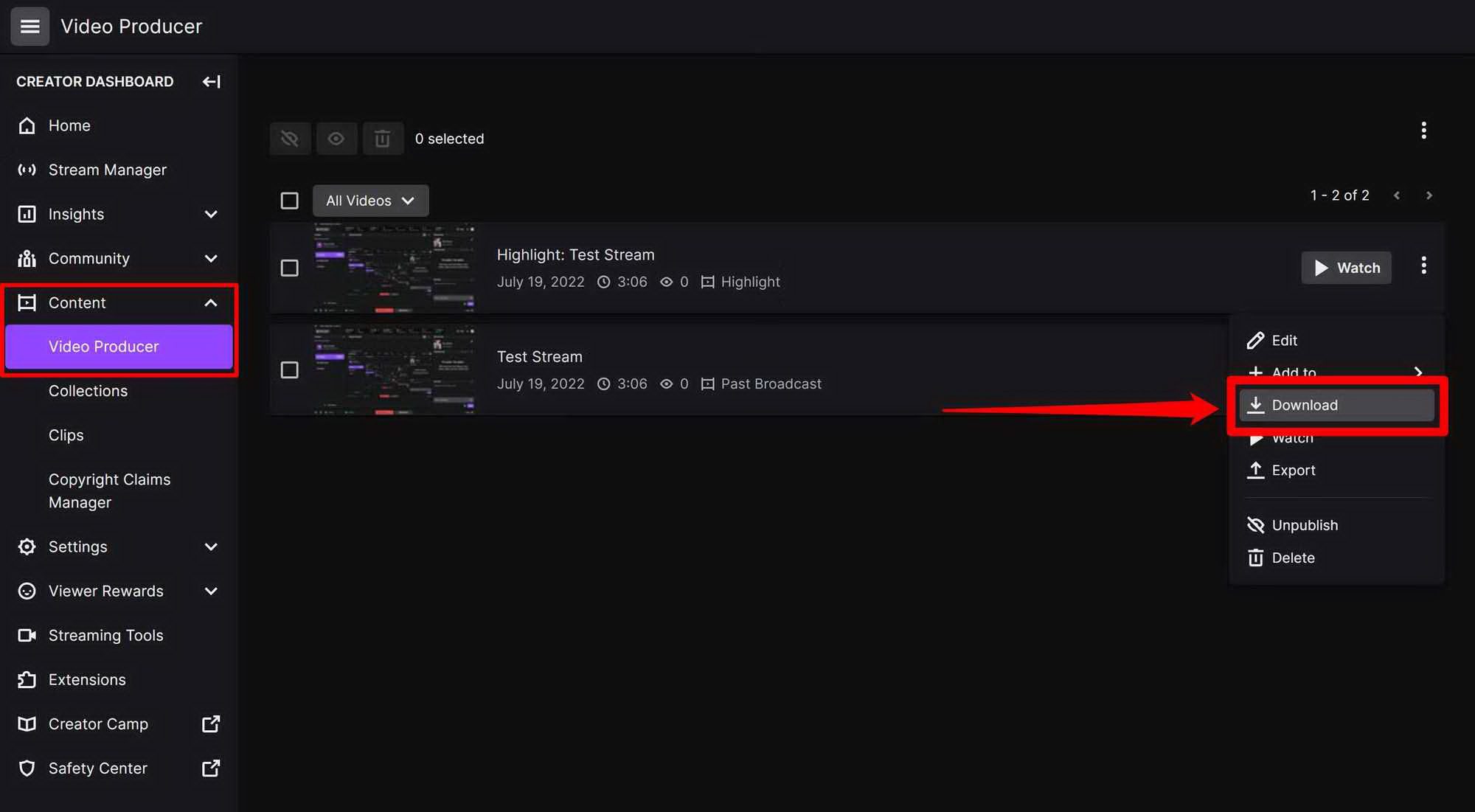
Step 1: When you follow the steps in part 3, and you locate Video Producer. Click the Highlight button next to a VOD video.
Step 2: Select the parts you want to keep and save them.
Step 3: You can also click the three dots and choose Download the video.
2. Use a Third-Party VOD Downloader
Twitch allows viewers to download Twitch short clips from Share menu directly, which are under 60s videos. However, for full broadcast videos, Twitch does not allows viewers to download, and this is mainly due to copyright. If you want to download others’ recorded Twitch streams, I think you need professional third party video downloader.
The most reliable one is Moyea Video Downloader. The biggest advantage is that you don’t have to worry about your favorite streamer’s content disappearing after the day limit. I like that it can save high-quality video files, up to 8K resolution, and it even removes annoying ads that usually interrupt the stream. You can save the video in MP4/MKV formats in batch, and there are more than just Twitch, you can download videos from even YouTube, TikTok, Facebook, etc. This is the most solid way I’ve found to download Twitch videos that you can try it out. Using it is also very easy, follow the steps below.
Step 1: Click on the three dots at the upper right corner to enter settings. Change the saving path for the downloads.
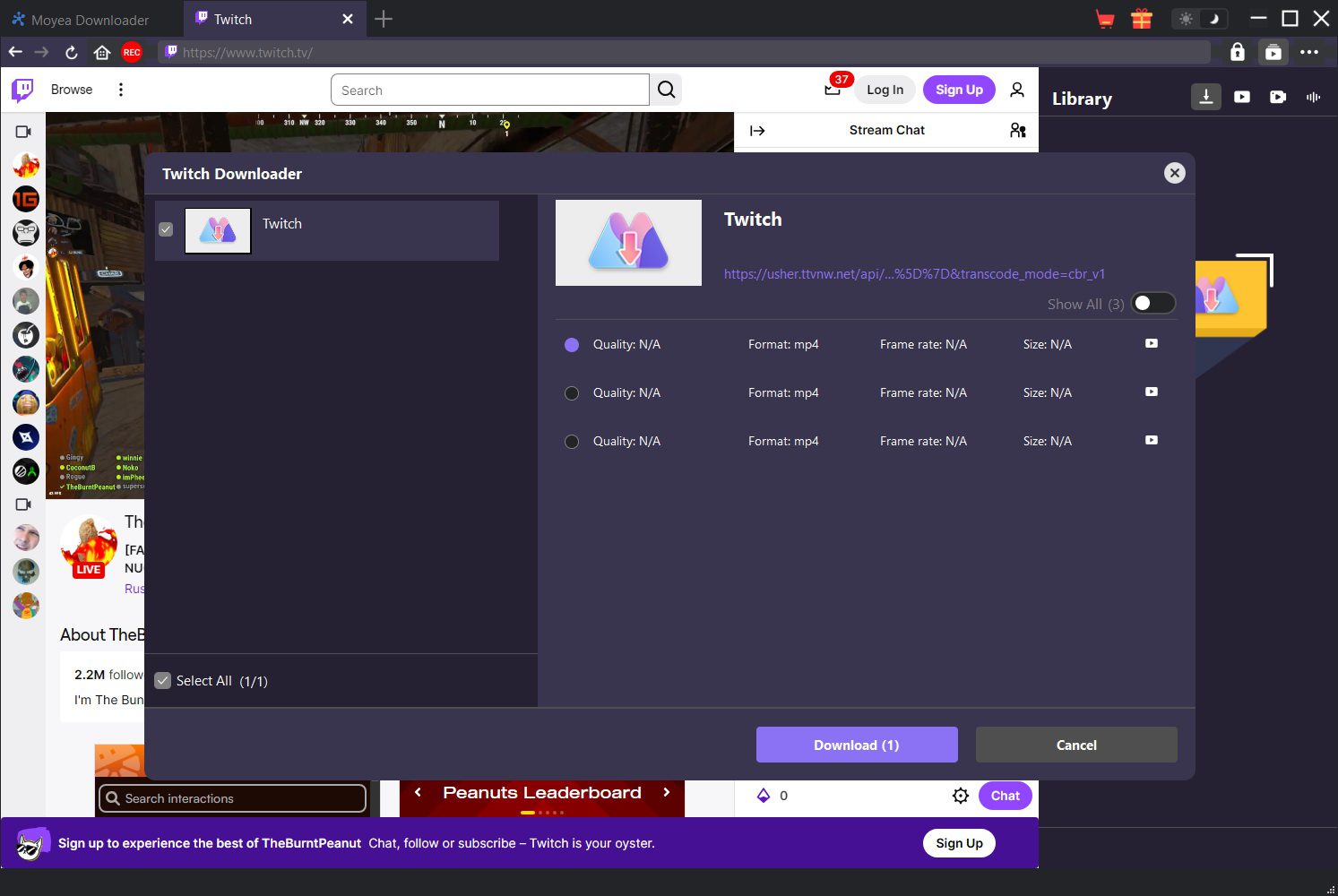
Step 2: Copy and paste the Twitch video URL to the downloader. Play it to let the download parse the video.
Step 3: From the pop-up resources, choose one video from different quality to download.
Part 5: Conclusion
Twitch VOD is a great tool not just for streamers, but also for viewers. Even if you missed the live show, the amazing moments aren’t lost. In this article, I gave everything you need, from how to enable it to how to save the videos from Twitch. But, due to the time store limits, if you want to keep others’ Twitch VODs forever, I strongly recommend using Moyea Video Downloader before they disappear.
FAQs
1. What is a Twitch VOD used for?
A Twitch VOD is a tool to record past live stream to let viewers watch the broadcast they missed, and help streamers grow their audience even when they aren’t live.
2. Why is my Twitch VOD not saving?
You probably did not enable “Store past broadcasts” feature. By default, Twitch doesn’t save your live streams automatically.
3. Can anyone watch Twitch VODs?
Yes, unless the streamer has set their VODs to “Subscriber-Only” mode or deleted them, anyone can visit the channel’s video tab to watch them.
4. Are Twitch VODs saved automatically?
No. You must manually turn on the storage option in your settings before you start your live stream for it to be saved.
5. Can I download Twitch VODs?
Streamers can download their own VODs directly from the Video Producer. Viewers, however, need a third-party tool like Moyea Video Downloader to save full videos.
6. Is there a way to save Twitch VODs permanently?
Yes. As a streamer, you can save your VOD to Highlight or download the video offline on your computer. But if you are a viewer, you cannot download others’ VODs.
7. Can I download a Twitch VOD while the stream is still live?
No. The VOD needs time for the video to become available for download. So, at least you need to wait for the archive to generate.
-

Twitch VOD: What It Is and How It WorksSunny Wen/2026-04-24
-
Full Review of Savethevideo: Is Savethevideo Safe?Patrick Murray/2026-04-21
-
Fix Guide: Prime Video Download Not WorkingPatrick Murray/2026-04-21
-
Is Crunchyroll Free? How to Watch Anime Without PayingSunny Wen/2026-04-20
-
StreamFab Netflix Downloader Review: Features, Pros & ConsCassie J./2026-03-31
-
5 Hulu Family Sharing Tips for Smooth ViewingCassie J./2026-03-30
-
Netflix Not Working on Roku? Solve It NowCassie J./2026-03-27
-
3 Proven Ways to Watch Netflix Without AdsCassie J./2026-03-25
-
Apowersoft Streaming Video Recorder Review: Features, Pricing, and AlternativesSunny Wen/2026-03-24
-
Best Amazon Prime Video Recorders: Record with the BestPatrick Murray/2026-03-19








-
Top 5 Udemy Downloaders to Download Udemy Courses on PCPatrick Murray/2025-07-03
-
Best 9 Anime Download Sites to Download Anime [Free & Paid]Patrick Murray/2024-07-12
-
4 Best DRM MPD Downloaders in 2026Leia Liu/2025-05-29
-
HBO Max with Ads VS. No Ads: What Are the DifferencesLumi/2025-05-13
-
6 Best M3U8 Downloaders to Download M3U8 PlaylistsLumi/2025-05-22
-
[2024] How to Download DRM-Protected M3U8 VideosLumi/2024-10-29
-
How to Stream Prime Video on Nintendo Switch?Patrick Murray/2024-09-14
-
How to Activate Tubi on Different Devices? [LG, FireStick, Roku, PS5…]Cassie J./2024-09-24
-
[2026 Latest Review] Best Amazon Prime Video DownloadersPatrick Murray/2025-05-16
-
How to Download an MPD Video with DRMLeia Liu/2024-09-20





Related
Full Review of Savethevideo: Is Savethevideo Safe?

Is Crunchyroll Free? How to Watch Anime Without Paying
YouTube TV DVR: How It Works and How to Record Live TV
Download PBS Videos Easily: From Public Clips to Passport Shows
How to Mute or Unmute Someone on Instagram

How to Update Instagram App to Get the Latest Features


 English
 日本語
日本語